QuickBooks for Construction Companies: A Strategic Framework for Profitability

Updated: 6 days ago
Most construction firms use QuickBooks as a digital shoebox for receipts, but treating it as a simple ledger is the fastest way to erode your project margins. You've likely felt the exhaustion of manual job costing in messy spreadsheets or the nagging anxiety of payroll compliance. It's frustrating when your Chart of Accounts feels like a tangled web that makes reporting useless. We understand that for QuickBooks for construction companies to be effective, it must function as a specialized framework rather than a generic record-keeping tool.
This guide demonstrates how to transform your software from a basic administrative burden into a strategic engine for profitability. By shifting your focus from simple data entry to structural integrity, you can unlock automated job costing and gain clear insight into which projects are actually driving your bottom line. We will walk through the essential setup steps and reporting workflows that turn your financial data into lender-ready statements and a reliable roadmap for long-term growth.
Beyond Basic Bookkeeping: Why QuickBooks is Essential for Construction
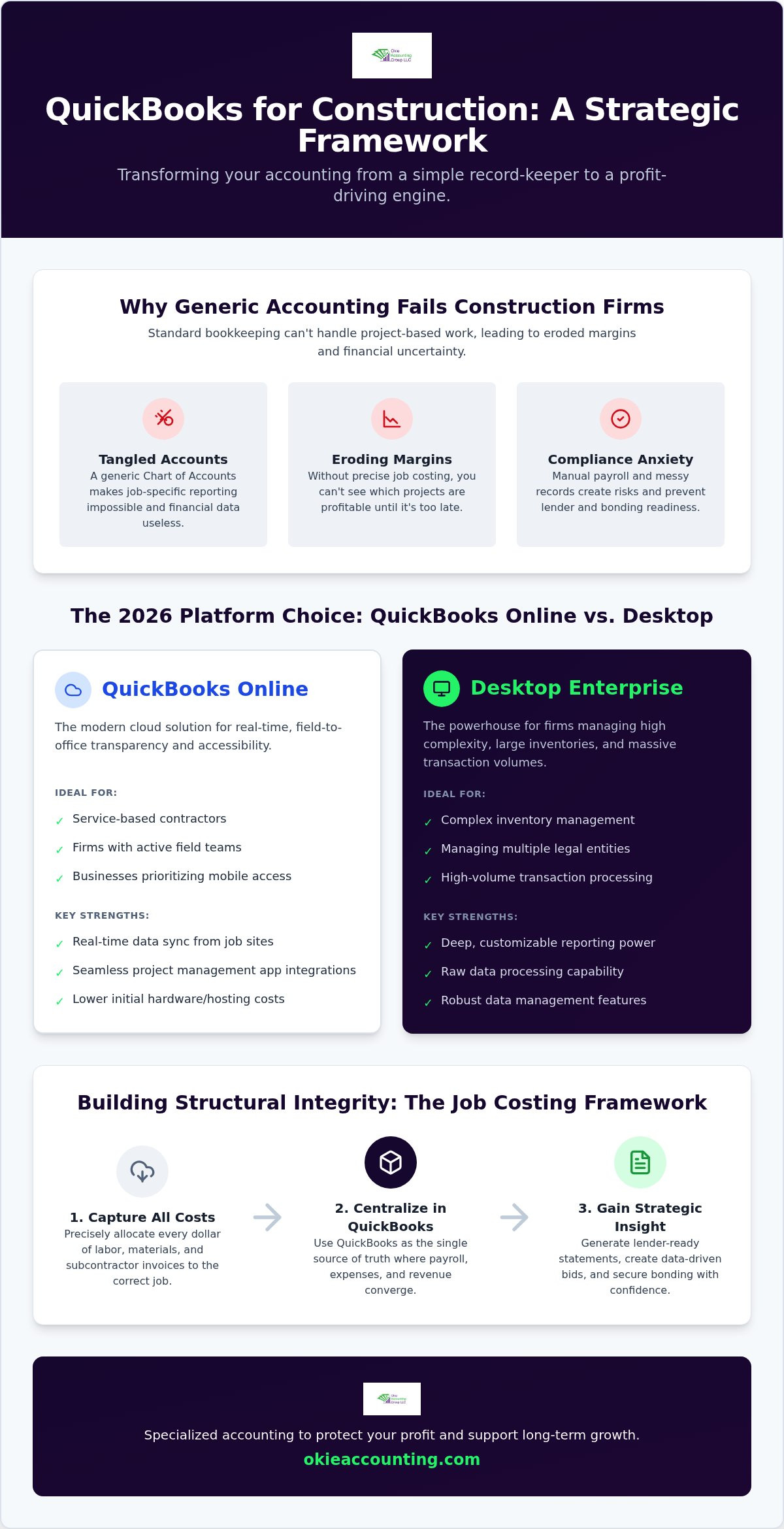
Construction firms operate on razor-thin margins. A single error in labor allocation or a missed subcontractor invoice can sink a project's profitability before the framing is even complete. Standard bookkeeping practices, which often focus on a broad company-wide Profit and Loss statement, fail to capture the granular reality of the job site. For your firm to thrive, you need a system that tracks every dollar back to its specific source. This is where QuickBooks for construction companies becomes more than just a software choice; it becomes the structural foundation of your business.
Specialized accounting provides the visibility required to secure bonding and impress lenders. Banks don't just want to see that you have cash in the bank. They want to see that you understand your Work in Progress (WIP) and can accurately predict your over/under billings. By moving beyond basic administrative tasks, you build a scalable infrastructure that supports long-term health rather than just survival. This level of financial readiness ensures that when a major opportunity arises, your books are already prepared to pass the most rigorous scrutiny.
The Shift from General Ledger to Project Tracking
Most generalist accountants look at your business through a wide-angle lens. While this works for retail, it's dangerous for contractors. You must track costs at the job level to understand which projects are truly profitable. Implementing a rigorous Job costing methodology allows you to see the real-time performance of every contract. This project-centric data is invaluable for future bidding. When you know exactly what your last five deck builds or commercial build-outs cost in labor and materials, your estimates become data-driven instead of based on guesswork. High-risk industries require this level of precision to maintain a high-reward trajectory.
Building Structural Integrity in Your Financial Data
Construction Accounting is a system designed specifically for project-based cost and revenue tracking. Think of your accounting software as the central hub where payroll, expenses, and revenue converge into a single source of truth. Without this structural integrity, your data becomes a liability rather than an asset. Proper QuickBooks setup and training ensures that every entry feeds into a larger strategic framework. QuickBooks for construction companies should act as a proactive mentor, highlighting potential cash flow gaps before they become crises. This organized approach creates a sense of order and predictability, allowing you to focus on the build while we focus on the framework that protects your profit.
QuickBooks Online vs. Desktop Enterprise for Contractors in 2026
The accounting landscape for the construction industry reached a definitive turning point on May 31, 2026. With support for most legacy QuickBooks Desktop versions now discontinued, many firms face a critical choice. Selecting the right version of QuickBooks for construction companies isn't just a matter of software preference. It is a strategic decision that dictates how your team accesses data, how you track job costs, and how your financial infrastructure scales over the next five years. While the cloud was once seen as a "lite" option, it has evolved into a robust contender for heavy-duty construction needs.
Choosing between these platforms requires an analysis of your total cost of ownership. Beyond the subscription price, you must consider hosting fees for Desktop versions and the cost of third-party integrations for Online versions. Each platform offers distinct advantages in the balance between raw computing power and real-time accessibility. Our goal is to ensure your software choice supports your long-term stability rather than creating a bottleneck for your growth.
When to Choose QuickBooks Online
Service-based contractors and firms with active field teams often find QuickBooks Online (QBO) superior. Its primary strength lies in its ecosystem. Project managers and supervisors can track time, approve expenses, and view project reports from the job site. This immediate data entry reduces the administrative lag that plagues many construction offices. When paired with specialized QuickBooks setup for contractors, QBO acts as a central hub that connects seamlessly with modern project management apps. If your priority is field-to-office transparency and real-time visibility, the cloud is ready for you.
When Desktop Enterprise is Still the Standard
QuickBooks Desktop Enterprise remains the logical choice for firms managing complex inventory, multiple legal entities, or massive transaction volumes. It provides a level of depth in reporting and data processing that browser-based tools sometimes struggle to match. However, the trade-off is accessibility. To get the same remote features as QBO, you'll likely need to pay for a dedicated hosting service. Sarah O’Quinn works with firms to evaluate these trade-offs through a disciplined, strategic lens. We help you determine which platform fits your specific transaction volume and technical needs. If you're unsure which path secures your profit protection, you can schedule a discovery call to review your firm's specific requirements.
Leveraging Job Costing and Project Tracking for Profit Protection
Profit is not a result you wait for at the end of a contract; it's a metric you actively defend every single day. In the high-stakes environment of QuickBooks for construction companies, profit protection starts with granular visibility. Job Costing is the process of assigning every dollar spent to a specific project and cost code. Without this level of detail, your financial statements are merely historical records rather than strategic tools. When costs are allocated daily, you can identify "profit bleed" early enough to adjust course before a project concludes.
Accurate job costing is also the bridge to sophisticated Work in Progress (WIP) accounting. While many generalist accountants focus only on the income statement, construction requires a deep understanding of how project costs impact the balance sheet. By tracking materials, labor, and subcontractor expenses against specific jobs, you can calculate over and under billings with precision. This ensures your financial health is represented accurately to lenders and bonding agents, reflecting your true capacity and operational stability.
Tracking Labor and Burdened Rates
Tracking gross wages alone provides an incomplete picture of your project expenses. To protect your margins, you must account for the "burdened" rate, which includes payroll taxes, workers' compensation, and benefits. QuickBooks for construction companies offers powerful integrations with QuickBooks Time and Payroll to automate this allocation. These systems ensure that every hour worked is tied to the correct project and cost code, reducing manual entry errors. For firms looking to tighten these workflows, specialized Construction Payroll Services provide the necessary oversight to maintain compliance and accuracy.
Advanced Reporting: The Contractor’s Dashboard
Data is only useful if it drives decision-making. Your QuickBooks environment should serve as a dashboard featuring three essential reports: Job Profitability Detail, Estimates vs. Actuals, and Unbilled Expenses. These reports highlight variances between your original bid and reality, allowing you to refine future estimates. A fractional controller uses this data to provide high-level strategic advice, helping you interpret complex trends and scale your operations with confidence. This transition from software user to strategic partner is what distinguishes successful firms from those that merely survive.
Avoiding the "Messy Books" Trap: Common QuickBooks Setup Mistakes
Most construction firms treat their software like a digital filing cabinet, but a poor setup turns valuable data into a liability. When QuickBooks for construction companies is initialized using a generic template, it lacks the structural integrity needed to track project-specific variables. One of the most common pitfalls is the misclassification of workers. Treating a regular laborer as a subcontractor to avoid payroll taxes can lead to severe penalties and audit risks. Similarly, failing to reconcile bank accounts and credit cards monthly means you're making strategic decisions based on unverified, potentially inaccurate balances.
A disciplined approach to setup ensures that your financial data remains a reliable asset. This requires moving beyond basic data entry to create a system that mirrors the physical reality of your jobs. Without regular reconciliation and proper classification, your reports will never provide the clarity you need to scale. We focus on building these foundational systems so you can lead your firm with quiet confidence, knowing your numbers are grounded in reality.
The Chart of Accounts: Your Financial Blueprint
A generic Chart of Accounts (COA) is the primary reason reporting becomes useless for contractors. Your COA should mirror your estimating categories to ensure a seamless flow of data from the bid to the final invoice. If your estimate tracks specific phases like site prep or framing, your accounting should reflect those same divisions. This alignment facilitates accurate WIP reporting and prevents costs from getting lost in vague expense categories. For a deeper dive into optimizing these settings, see our guide on Mastering QuickBooks for Contractors. Proper structure is the first step in protecting your profit margins.
Retainage and Progress Billing
Retainage is a unique mechanical challenge that often trips up generalist bookkeepers. Failing to set up dedicated retainage receivable and payable accounts results in inflated revenue figures or hidden liabilities. You must establish a logic where retainage is withheld on progress invoices but remains visible on the balance sheet until the project's completion. Effective Management Accounting relies on this accuracy to maintain healthy cash flow throughout the project lifecycle. Progress billing ensures you're funded for the work performed, but only if your system correctly tracks what is still owed to you.
If your current setup feels like a tangled web of data, it's time to build a more reliable framework. You can request a forensic review of your QuickBooks file to identify and resolve these common structural errors. Accurate data is the only way to protect your profit and scale with confidence.
Moving from Software to Strategy: The Okie Accounting Group LLC Approach
Software doesn't make decisions; people do. For QuickBooks for construction companies to yield real value, it requires professional financial leadership. Okie Accounting Group LLC moves beyond basic data entry to offer a disciplined, strategic partnership. Sarah O’Quinn’s specialized expertise in construction allows Okie Accounting Group LLC to act as your high-level advisor, interpreting complex reports to identify growth opportunities and mitigate risks. This transition from "survival mode" to "strategic growth" is the core of our methodology. We don't just record what happened last month; we help you plan for what happens next year.
Many contractors find themselves in a reactive cycle, constantly putting out financial fires. A proactive partnership with Okie Accounting Group LLC changes this rhythm. Instead of worrying about payroll compliance or inaccurate margins, you gain a sense of reliability and dedication from a partner who understands the unique mechanics of your market. We focus on the broader implications of your financial health, ensuring your systems are organized and your choices are data-driven. This creates an atmosphere of trust where you feel that your complex needs are understood by experts who are as invested in your success as you are.
Customized Training and Ongoing Oversight
We don't believe in one-size-fits-all solutions. Okie Accounting Group LLC provides QuickBooks training tailored to your specific construction niche, ensuring your team knows how to handle the nuances of your particular market. Whether you are a specialized subcontractor or a large-scale general contractor, your workflows must be precise and repeatable. Regular monthly reviews with Okie Accounting Group LLC ensure your data remains clean and actionable. This oversight is a hallmark of our Construction Bookkeeping Services, which are designed to build a framework for long-term health rather than just short-term compliance.
Building Long-Term Health and Stability
Our focus remains on profit protection and structural integrity. By building a robust financial system today, Okie Accounting Group LLC prepares your firm for bonding, lending, and eventual succession or sale. Banks and bonding agents look for stability and rigorous management; we provide the meticulous, forward-thinking approach they require. This structured approach makes your information easy to digest while reinforcing an image of an organized and methodical partner. If you are ready to move from administrative complexity to operational clarity and confidence, you can schedule a strategy session with Okie Accounting Group LLC today.
Building the Framework for Lasting Profitability
Transforming QuickBooks for construction companies from a basic ledger into a strategic profitability engine requires a commitment to structural integrity. As we have explored, this involves moving beyond simple data entry to implement specialized job costing, accurate burdened labor rates, and a Chart of Accounts that mirrors your project reality. These foundational systems ensure that your financial data is not just a record of the past, but a reliable blueprint for future bidding and growth. By eliminating setup errors and embracing real-time field data, you position your firm for long-term stability and profit protection.
Success in the construction industry requires a proactive partnership that bridges the gap between software features and strategic leadership. Okie Accounting Group LLC provides the specialized construction and real estate expertise needed to navigate these complexities. With our cloud-based strategic oversight and nationwide remote financial leadership, your business gains the clarity required for bonding, lending, and scaling. We are dedicated to building the systems that allow you to focus on the build while we secure the financial framework that supports your success.
Frequently Asked Questions
Which version of QuickBooks is best for a small construction company?
QuickBooks Online Plus is generally the most effective starting point for small construction firms because it includes essential job costing and inventory tracking features. For companies needing more advanced project budgeting and custom fields, QuickBooks Online Advanced offers a more robust structural framework. These cloud-based versions provide the real-time field access necessary for modern project management and remote collaboration.
How do I set up job costing in QuickBooks Online?
You set up job costing by enabling the "Track expenses and items by customer" and "Track billable expenses" options within the Account and Settings menu. Once these are active, use the "Projects" center to organize all income, labor, and material costs under a specific job. This specialized setup ensures that every transaction is tied to a project, allowing for accurate profit protection and reporting.
Can QuickBooks handle AIA billing and retainage?
QuickBooks can handle the underlying data for AIA billing through progress invoicing and custom item mapping, though it does not produce G702/G703 forms natively. Retainage is managed by creating a "Retainage Receivable" Other Current Asset account and a "Retainage" service item. This manual structural framework allows you to track withheld funds accurately on your balance sheet until the project is finalized.
What is the difference between construction accounting and regular accounting?
Construction accounting is project-centric rather than period-centric, focusing on job costing and Work in Progress (WIP) rather than just company-wide monthly totals. Regular accounting tracks overhead and sales by date, while construction systems track costs by activity codes and specific contracts. This specialized approach is necessary to manage the long-term nature and high-risk margins of building projects.
How do I track subcontractor insurance and 1099s in QuickBooks?
Track subcontractor insurance by using custom fields in the Vendor center to record expiration dates for General Liability and Workers' Comp policies. For 1099 reporting, mark vendors as "1099 eligible" and map your Chart of Accounts to the appropriate boxes. For payments made in 2026, the federal reporting threshold for Form 1099-NEC has increased to $2,000 under the One Big Beautiful Bill Act.
Is QuickBooks Desktop being phased out for contractors in 2026?
Support for QuickBooks Desktop versions 2023 and earlier, including payroll and bank feeds, ended on May 31, 2026. While Intuit has discontinued sales of several desktop products, QuickBooks Desktop Enterprise remains the only version still actively sold and supported for new users. Many firms are using this transition as an opportunity to migrate to QuickBooks for construction companies in the cloud for better field connectivity.
How does QuickBooks help with Davis-Bacon payroll compliance?
QuickBooks helps with Davis-Bacon compliance through the QuickBooks Workforce Elite tier, which can generate Department of Labor Form WH-347 certified payroll reports. This automated system tracks prevailing wage rates by labor class and project, ensuring your payroll remains compliant with federal requirements. Proper setup of these pay types is a critical part of building a reliable financial infrastructure for government contracts.
What are the most important financial reports for a contractor to review monthly?
Contractors should prioritize the Job Profitability Detail, Estimates vs. Actuals, and the Work in Progress (WIP) report every month. These reports reveal where "profit bleed" is occurring and whether your current billings cover your earned revenue. Reviewing these with a strategic partner ensures you are making data-driven decisions that protect your QuickBooks for construction companies investment and your project margins.


Comments