QuickBooks Training for Construction Contractors: Build a Job-Level System

Updated: Nov 7
QuickBooks can show more than what your company spent. With consistent job-level records, it can help you understand how each project is performing. That takes more than learning which buttons to click. QuickBooks training for construction contractors should cover the workflows behind the numbers, because inconsistent entries and costs assigned to the wrong jobs can make project reports hard to trust.
Useful training helps your team use the software confidently and consistently. Generic tutorials often skip the construction accounting details that shape reliable records, such as a job-ready Chart of Accounts and clear rules for coding expenses. When staff follow the same process, owners can review project-level financial information with greater clarity.
This article explains what effective training should cover, including job costing, change orders, progress billing, and the reports that help you assess project performance. You’ll also learn how personalized instruction can fit alongside QuickBooks setup, bookkeeping, and broader financial oversight, and how to reinforce consistent practices as your business grows.
Why QuickBooks Training for Construction Contractors Must Reflect Job-Based Work
Recording a bill tells you what the company owes. It doesn’t automatically show whether the project that generated the bill is on budget, how costs compare with progress, or what remains to be collected. Generic software instruction often misses the link between entering transactions and understanding project performance.
QuickBooks training for construction contractors should teach users to handle their actual accounting responsibilities within construction workflows. That means connecting daily tasks, such as recording bills and payments, to the project records and reports those tasks support. Okie Accounting Group LLC provides QuickBooks setup and personalized training grounded in construction accounting workflows, alongside construction-focused bookkeeping and financial oversight. Its QuickBooks setup and training helps teams build a consistent foundation for their work.
What makes construction bookkeeping different from general business bookkeeping?
A contractor may have several active jobs at once, each with its own scope, schedule, purchasing activity, and billing milestones. The company needs an overall view of expenses and income, but owners also need records that show which project each transaction belongs to. Construction accounting concepts such as job costing and progress billing are described in Construction Accounting Principles.
Consider a hypothetical renovation with labor, materials, and equipment costs arriving at different points in the schedule. If a materials bill is entered under the right general expense category but attached to the wrong job, company totals may still look plausible while the project’s costs become misleading. Consistent classification keeps costs useful both in the company’s accounts and in job-level review. The same transaction can tell a different story depending on how it’s recorded.
What should contractor QuickBooks training help users do?
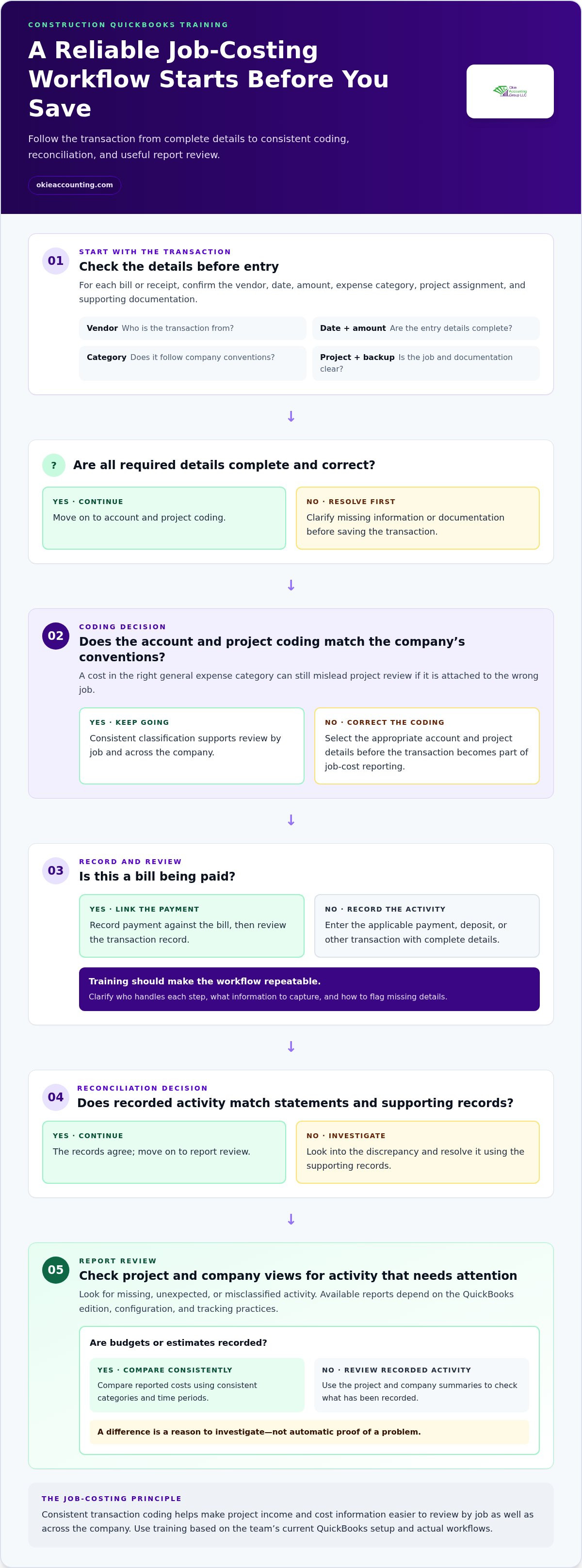
Training should connect routine actions into a repeatable process: enter a vendor bill, assign the correct account and project details, record payment against the bill, and review the transaction. It should clarify who handles each step and what information to capture. When team members follow the same conventions, reports draw on more consistent records and are easier to interpret.
Job-costing data is project income and cost information classified consistently so a contractor can review financial activity by job as well as across the company. That structure depends on more than software familiarity. A user may know how to enter a transaction but still need guidance on which project to select, how to classify the cost, and when to flag missing details. Practicing recurring workflows helps make those decisions part of the routine instead of a month-end guess.
The broader software training service provides practical instruction as part of a sound accounting system. For foundational software context, the linked contractor QuickBooks guide can complement workflow-specific learning. Training should focus on the records your team creates and the questions your reports need to answer.
The QuickBooks Skills Construction Teams Need for Reliable Job Costing
Job-cost reports are only as useful as the transactions behind them. A bill entered under the wrong expense category, assigned to the wrong project, or recorded late can distort the information a contractor uses to review costs. Training should build a connected workflow: enter activity accurately, apply consistent coding, reconcile accounts, and examine reports in context.
A practical skills checklist for construction team members includes:
Accurate entry: Record bills, payments, deposits, and other transactions with complete details.
Consistent categorization: Apply the company’s account and project-coding conventions.
Reconciliation: Compare recorded activity with statements and supporting records, then investigate discrepancies.
Report review: Check project and company summaries for missing, unexpected, or misclassified activity.
The structure matters as much as the individual clicks. Accounts, project records, and tracking fields should reflect how the contractor reviews costs, and staff need to use them consistently. Understanding Construction Job Costing explains why project-specific cost tracking differs from reviewing expenses only in aggregate. QuickBooks features and workflows vary by edition and configuration, so training should use the company’s current setup rather than assume every user sees the same tools.
How should users record and categorize job costs?
For each bill or receipt, users should confirm the vendor, date, amount, expense category, project assignment, and supporting documentation before saving. They should also verify how payments are applied and keep a clear transaction record. A consistent review routine can surface missing job details early. If team members code subcontractor costs differently, estimated-to-actual comparisons become harder to interpret, even when each transaction is recorded.
Which reports should a contractor learn to interpret?
Users should learn to move between job-level and company-level views, keeping in mind that available reports depend on the QuickBooks edition, configuration, and tracking practices. Where the business records budgets or estimates, compare those amounts with reported costs using consistent categories and time periods. A difference is a reason to investigate, not automatic proof of a problem. Reports show recorded activity; forecasting or controller-level analysis can add context about timing, commitments, and financial decisions.
Consistent transaction coding makes job-cost reports easier to interpret because each project’s income and costs follow the same classification rules. Clear procedures and team adoption build that discipline, not software familiarity alone. To discuss aligning your team’s training with its accounting workflows, schedule a conversation about QuickBooks training.
How to Evaluate QuickBooks Training for Construction Contractors
The right learning approach depends on what your team needs to do after the lesson. A tutorial can answer a narrow software question, but it may not show staff how to apply company procedures or explain why a job report doesn’t match expectations. Compare options by considering who they serve, how closely they reflect construction workflows, and whether learners can practice relevant tasks.
These approaches can complement each other. A tutorial can answer a one-off navigation question, while team instruction establishes shared procedures. Personalized QuickBooks training for construction contractors is especially useful when the goal is to connect software actions to how the company tracks projects, handles transactions, and reviews financial information.
When can general QuickBooks tutorials be enough?
Self-guided resources can work well for routine questions, such as where to find a transaction or how to complete a familiar software action. Users can learn at their own pace and revisit a specific step. But if team members aren’t sure how projects should be set up or which internal procedure to follow, a generic demonstration may show the mechanics without resolving the process question.
When is personalized contractor training more useful?
Personalized instruction can focus on the roles, recurring tasks, and questions your team actually encounters. A trainer can use representative scenarios, such as reviewing a supplier bill or tracing a cost to a project, and explain how those steps fit your procedures. Software navigation shows users where to click; workflow-specific instruction teaches how each action fits the company’s accounting process.
Training alone won’t correct an unsuitable accounting structure or fill gaps in incomplete historical records. Those issues can be addressed through setup or ongoing bookkeeping before reports are interpreted consistently. Okie Accounting Group LLC provides QuickBooks setup and personalized instruction for construction businesses. Its QuickBooks training services work alongside the systems that support day-to-day bookkeeping.
Prepare Your Construction Team for Practical QuickBooks Training
Good preparation makes QuickBooks training for construction contractors practical. Instead of touring features without a clear connection to daily responsibilities, the session can focus on the tasks your team handles. Before training, identify who uses the system, where transactions or approvals stall, and what financial questions staff need reports to answer. Gather examples that make those needs concrete.
Define the goals. Choose the work training should support, such as recording project costs consistently, understanding a report, or clarifying how a transaction moves from receipt to review.
Map user roles. List who enters bills, records payments, reviews transactions, approves costs, and reconciles accounts. Note where several people handle a task or a handoff is unclear.
Inventory recurring tasks. Identify routine transaction types and the information staff need to complete each one. Include exceptions that regularly cause questions, not only the simplest examples.
Gather representative materials. Bring process notes, anonymized or otherwise appropriately protected transaction examples, and the reports users need to interpret. Use approved channels for sensitive financial information.
Write down open questions. Ask staff to note where they hesitate, what details are often missing, and which report results are hard to explain. These specifics keep instruction relevant to actual work.
Assign follow-up responsibilities. Decide who will document agreed procedures, reinforce the new routine, and raise questions if the process or software setup needs review.
What should owners and staff bring to a training session?
Bring a concise list of process questions, examples of common transactions, and the reports each role needs to understand. Include a simple description of approval steps and handoffs, especially where it’s unclear who enters, checks, or authorizes information. Examples should illustrate the workflow without exposing sensitive details unnecessarily. Follow your organization’s approved practices for handling financial records, account access, and confidential project information.
How can a company reinforce new QuickBooks habits?
After training, assign a clear owner to recurring entry, review, and reconciliation tasks. Write down agreed procedures in plain language, including what information a user must capture and when an issue should be escalated. Schedule periodic checks to surface confusion early, confirm staff are following the same process, and update instructions when responsibilities or workflows change. Training is a starting point; shared ownership makes the routines stick.
For construction teams, Okie Accounting Group’s QuickBooks setup and personalized training connect instruction to practical accounting workflows. Discuss your QuickBooks training needs and the questions your team wants to address.
How Okie Accounting Connects QuickBooks Training to Construction Financial Clarity
For construction businesses, QuickBooks instruction is most useful when it connects software use to how financial information is created, maintained, and reviewed. Okie Accounting Group LLC provides QuickBooks setup and personalized training for construction companies, grounded in their workflows and the responsibilities of owners and staff. Based in Tennessee, the firm serves clients remotely across the United States, including businesses in Tennessee and Jacksonville, Florida.
This practical focus helps teams see how their processes shape the records used for project and company reporting. QuickBooks setup and training can address the accounting structure and routines behind day-to-day use, with instruction tailored to the business rather than treated as a one-size-fits-all process.
What can personalized QuickBooks training address?
Personalized training can focus on the tasks different people handle, the workflows they follow, and the questions that arise as construction activity is recorded. An owner may need to understand how project information appears in reports, while a staff member may need clarity on transaction entry or review responsibilities. Instruction connects those roles to consistent job-related records and the company’s bookkeeping practices.
The goal is not simply to demonstrate software functions. It is to help users understand how their actions contribute to a coherent accounting process. Training can also identify procedures that need clarification or show how the QuickBooks setup affects the way information is organized. Instruction is grounded in the business’s workflows and configuration, with a focus on practical use.
When might training need broader accounting support?
Training teaches users how to work within a process; it doesn’t replace the ongoing work of maintaining and reviewing financial records. If transactions are incomplete, project details are applied inconsistently, or prior records need attention, bookkeeping support can address those records alongside instruction. Regular bookkeeping helps maintain the financial information owners rely on, while clear routines help staff understand their role in keeping it current.
Some construction businesses also need a higher level of financial review to interpret results and support management decisions. Fractional controller services provide strategic oversight, distinct from teaching routine software use or maintaining bookkeeping records. The right mix depends on the company’s needs: training supports staff capability, bookkeeping supports consistent record maintenance, and controller-level oversight adds a broader view of financial performance. These services address different parts of the financial system and aren’t interchangeable.
Okie Accounting Group LLC provides QuickBooks training for construction contractors, alongside related bookkeeping and financial oversight. To discuss the workflows, roles, and reporting needs your team wants to address, schedule a discovery call.
Put Your Financial System to Work on the Next Job
Use an upcoming project milestone as a checkpoint for your accounting system. Before the next job review, decide what information you need, who will use it, and which routine will keep it current. That gives your team a clear purpose for applying what it learns and a real reference point for refining the process.
QuickBooks training for construction contractors is most valuable as part of an ongoing commitment to sound financial habits, not a one-time software exercise. As responsibilities or project needs change, review whether your procedures still support the questions owners need answered. Deliberate adjustments can help keep your system aligned with how the business operates.
Ready to define a practical next step for your team? Schedule a discovery call to discuss construction-focused QuickBooks training. Start with the workflows and reporting questions your team wants to address.
Frequently Asked Questions
Is QuickBooks Online suitable for a construction contractor?
Yes, QuickBooks Online can suit a contractor if the selected plan and setup support the company’s project-tracking needs. In 2026, its Projects feature is available starting with Plus; Essentials and Simple Start don’t include it. Basic project tracking may not cover every construction workflow, such as specialized progress billing or retainage requirements. Consider what your team needs to track and report before choosing a plan, and verify current features as product options change.
Can QuickBooks track costs by construction project?
Yes, QuickBooks can track project-related costs when the software edition and configuration support project tracking and transactions are assigned appropriately. For example, a contractor might review materials and subcontractor expenses for a specific renovation separately from overhead. That view depends on complete transaction details and a consistent structure. A project report reflects the information entered; it isn’t a substitute for checking whether the underlying costs are complete or classified as intended.
How long does QuickBooks training for contractors take?
There isn’t one set duration for QuickBooks training for contractors. The time needed depends on what users already know, how well the accounting setup fits the business, and whether instruction covers a focused task or several roles and workflows. A session on finding transactions differs in scope from learning a company’s project tracking and report-review procedures. Define the tasks staff need to perform first, then tailor the training scope to those needs.
Can construction employees receive QuickBooks training as a team?
Yes, owners and employees can receive personalized instruction relevant to their work. Training can address shared procedures while clarifying role-specific responsibilities, such as who enters information and who reviews it. This helps staff apply common conventions without assuming every employee needs the same level of access or instruction. Okie Accounting Group serves clients remotely from Tennessee, including construction businesses in Tennessee and Jacksonville, Florida.
Is QuickBooks training the same as QuickBooks setup?
No. Setup involves configuring the accounting system for the business, while training teaches users how to work within that system. For example, a contractor may need project tracking established before staff learn how to use it consistently. Training on an unsuitable setup can leave users unsure which process to follow. Okie Accounting Group provides both QuickBooks setup and personalized training, addressing system structure and user knowledge as related but distinct needs.
What should I prepare before QuickBooks training?
Identify the QuickBooks edition and current setup your business uses, who needs instruction, and the tasks they handle. Bring a short list of questions and examples that don’t expose confidential information, such as a redacted bill or a description of a report that’s difficult to interpret. Note any access or approval constraints too. This preparation helps keep instruction focused while protecting sensitive financial and project records.


Comments