QuickBooks Training for Contractors: A Strategic Framework for Profit Protection

Updated: Nov 7
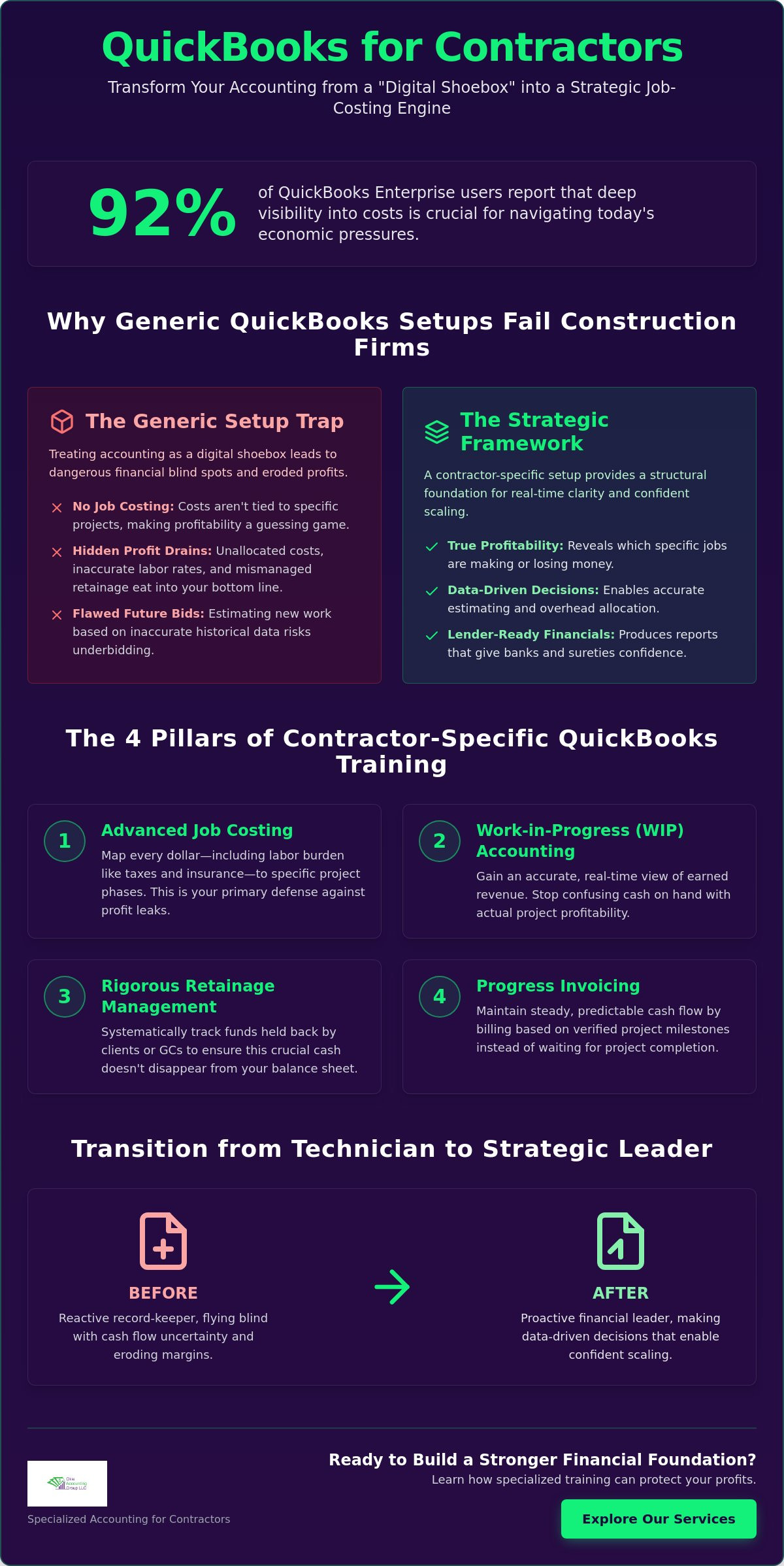
Your accounting software isn't just a tool for tax season; it's the primary defense system for your project margins. While many firms use it as a basic ledger, 92% of QuickBooks Enterprise users report that deep visibility into costs is what actually helps them navigate today's economic pressures. This is why specialized QuickBooks training for contractors is no longer optional for firms that want to protect their bottom line. You likely feel the stress of long project cycles where cash flow feels like a moving target and complex retainage complicates every invoice. It's exhausting to manage a high-volume firm when you're unsure if a specific job is actually making money or simply draining your reserves.
We'll show you how to move beyond basic administrative tasks to build a robust structural framework for your business. You'll learn how to transform your setup into a powerful job-costing engine that tracks labor burden accurately and produces lender-ready financial statements. We're going to explore the specific workflows that protect your profits, simplify complex billing, and provide the real-time clarity you need to scale with confidence.
Why Generic QuickBooks Setups Fail Construction Firms
Many construction business owners treat their accounting software as a digital shoebox for tax compliance. They record expenses, pay vendors, and wait for their accountant to tell them how they did at the end of the year. This administrative approach is a dangerous trap. It ignores the fundamental difference between simple record-keeping and structural financial management. Without a system designed for the unique mechanics of the industry, you're essentially flying blind. You might see a healthy bank balance today while unknowingly eroding your margins on a project that won't conclude for six months.
A standard Chart of Accounts is the primary culprit behind these financial blind spots. It groups expenses by type, such as "Materials" or "Subcontractors," but it fails to tie those costs to specific projects. This lack of granularity makes it impossible to determine which jobs are profitable and which are draining your cash. When you rely on guesswork for estimating and overhead allocation, you risk underbidding future work based on inaccurate historical data. Specialized QuickBooks training for contractors bridges this gap by moving your data from the field into a structured framework that mirrors your actual operations. A generic setup often hides:
Unallocated indirect costs that eat into net profit.
Inaccurate labor rates that don't account for payroll taxes or insurance.
Mismanaged retainage that skews your actual cash position.
Equipment depreciation that isn't tied to specific job usage.
The Problem with Off-the-Shelf Accounting
Off-the-shelf setups are built for retail or service businesses, not for the complexities of a job-site. They typically fail to track labor burden, which includes the true cost of employees beyond their hourly wage, such as taxes, benefits, and workers' compensation. They also overlook equipment costs and depreciation that should be allocated to specific phases of a build. Construction Bookkeeping is a project-centric financial discipline that prioritizes the allocation of every dollar to specific job phases and cost codes. Without this level of detail, you lose the project-level visibility required for data-driven decision making. This is why specialized construction accounting is the backbone of any successful firm.
Transitioning from Service Provider to Strategic Partner
Investing in QuickBooks training for contractors empowers you to move beyond the role of a technician and start acting as a strategic leader. When your financial data is accurate and organized, you gain a significant advantage when seeking bonding or bank financing. Lenders and sureties look for structural integrity in your reports; they want to see that you have a firm grip on your Work-in-Progress (WIP) and cash flow. By establishing these foundational systems, you transform your back office into a strategic asset. To dive deeper into these systems, explore our Mastering QuickBooks for Contractors: The 2026 Strategic Guide to see how to align your software with your long-term growth goals.
The 4 Pillars of Contractor-Specific QuickBooks Training
Building a structural framework for your firm requires more than surface-level software knowledge. It demands an understanding of how construction-specific financial events flow through your ledger. Professional QuickBooks training for contractors focuses on four essential pillars that ensure your data remains a reliable guide for growth. These pillars move you away from reactive record-keeping and toward proactive financial leadership.
First, advanced job costing ensures every dollar spent is mapped to a specific project and phase. This granularity allows you to identify which scopes of work are exceeding estimates in real-time. Second, Work-in-Progress (WIP) accounting provides an accurate view of your earned revenue. This prevents the common mistake of confusing cash on hand with actual profit. Third, rigorous retainage management tracks the funds held back by owners or general contractors. It ensures these amounts don't vanish from your balance sheet or your memory. Finally, progress invoicing maintains a steady cash flow by allowing you to bill based on verified milestones rather than waiting for project completion.
Mastering Job Costing and Labor Burden
Your "Products and Services" list in QuickBooks should be a mirror image of your project estimates. When these lists align, your accounting data flows directly into your reporting without manual translation. This setup must include a calculated labor burden. This incorporates payroll taxes, workers' compensation, and benefits into your hourly job costs. Precise job costing is the primary defense against profit leaks. Without it, you cannot accurately allocate indirect costs or overhead. This leaves you with a distorted view of your actual margins and makes it impossible to bid future work with confidence.
Navigating WIP and Revenue Recognition
Construction projects often span several months. This can lead to distorted financial statements if you only record revenue when you send an invoice. Professional training teaches you how to use adjusting entries to match revenue with the actual project costs incurred during a specific period. This process is a core component of management accounting for the construction sector. It helps you avoid the "over-billing" trap, where you spend cash that hasn't been earned yet. It also prevents the "under-billing" trap, where your project costs outpace your billings. If your current ledger lacks this structural integrity, you might benefit from a strategic review of your accounting workflows to identify hidden risks.
Streamlining Workflows Between the Field and the Office
Data integrity begins at the job site. If your field crews don't have a structured way to report time and expenses, your back office will always be playing catch-up. Implementing cloud-based time tracking allows for immediate labor allocation to specific cost codes. This eliminates the "Friday afternoon scramble" where workers try to remember which project they were on three days ago. When your team logs hours directly into a synchronized system, your labor burden calculations become precise rather than estimated. This level of accuracy is exactly what we emphasize during QuickBooks training for contractors, as it transforms your ledger from a historical record into a live management tool.
Standardizing receipt and bill capture is equally vital for profit protection. Lost receipts represent lost profit; if an expense isn't recorded, it can't be billed or used to offset revenue. By utilizing mobile capture tools, your team can photograph invoices the moment they're received at the lumber yard or from a subcontractor. This creates a digital trail that prevents project expenses from slipping through the cracks. Establishing these habits creates a feedback loop between project managers and the accounting team. It ensures that the people managing the build have the same financial data as the people managing the books.
Digital Document Management for Contractors
Modern construction accounting relies heavily on mobile technology to reduce administrative friction. Within QuickBooks, you can attach permits, contracts, and change orders directly to the project file. This ensures that everyone has access to the same version of the truth. Maintaining this level of data integrity in the field means fewer errors during the reconciliation process. It also provides a centralized repository for audit-ready documentation, which is essential for maintaining lender-ready financial statements. By reducing the distance between field operations and financial data, you protect your firm from the "blind spots" that often lead to project overruns.
The Strategic Advantage of Real-Time Reporting
Moving away from "rear-view mirror" accounting allows you to make mid-project course corrections before a minor overage becomes a major loss. When field data flows seamlessly into your financial reports, you gain a forward-looking perspective. This real-time visibility informs more accurate future project bidding by showing you exactly where your previous estimates were off. Building this type of feedback loop is a key part of Construction Bookkeeping Services: Building a Scalable Financial Infrastructure. Specialized QuickBooks training for contractors ensures your team knows how to interpret these reports to drive long-term stability and growth. You aren't just recording what happened; you're using data to dictate what happens next.
Common QuickBooks Mistakes That Drain Contractor Profits
Errors in your ledger are rarely just typos; they're often symptoms of a fractured structural framework. For many firms, these mistakes are treated as year-end cleanup tasks for an external accountant. This reactive approach is a significant operational risk that drains cash throughout the project lifecycle. Specialized QuickBooks training for contractors helps you identify these leaks before they compromise your firm's stability. When you treat your software as a live management tool rather than a historical archive, you gain the ability to stop profit erosion in its tracks.
One of the most pervasive issues is the co-mingling of personal and business expenses within project files. This doesn't just complicate tax season; it distorts your project-level data and makes true margin analysis impossible. Similarly, ignoring the labor burden when calculating project payroll costs results in a massive underestimation of your true expenses. If you aren't accounting for taxes, insurance, and benefits in your job costs, you're likely working for a much lower margin than your reports suggest. This oversight creates a false sense of security that can lead to disastrous bidding decisions on future work.
The Change Order Trap
Unrecorded change orders are a primary source of lost revenue for both general and specialty contractors. When a project's scope expands without an immediate update to the financial records, the work is performed but often remains unbilled. Best practices involve updating the estimate in QuickBooks the moment a change is authorized. This ensures that your invoices reflect the current contract price and that client sign-off is documented within your financial system. Without this discipline, you're essentially providing free labor and materials to your clients, which directly attacks your bottom line.
Reconciliation as a Profit Protection Tool
Monthly reconciliation of bank and credit card accounts is a non-negotiable step in maintaining financial readiness. It's not just a chore; it's a strategic process that uncovers "ghost expenses" and ensures project-level job costs align with your general ledger. If these two areas don't match, your profitability reports are effectively fiction. Through our software training, we emphasize that reconciliation is your final line of defense against data entry errors and fraudulent charges. This regular oversight builds a sense of order and predictability in your back-office workflows.
If you suspect your current setup is hiding these types of profit drains, it's time to establish a more rigorous oversight system. You can schedule a discovery call to discuss how to harden your financial infrastructure against these common pitfalls and reclaim control over your margins.
Beyond Training: Integrating Strategic Oversight
Software proficiency is a prerequisite, but it isn't the finish line. True profit protection comes from what you do with the data once it's clean and organized. While specialized QuickBooks training for contractors provides the technical skills to manage your ledger, high-level financial leadership requires a shift in perspective. You aren't just looking at what you spent; you're looking at what those expenditures mean for your firm's long-term health. This transition from technician to strategist is what separates firms that simply survive from those that scale with confidence.
Integrating strategic oversight ensures that your financial systems remain resilient as your project volume increases. It's about maintaining the structural integrity of your data through every phase of growth. When you have a clear roadmap for your financial future, you can make decisions based on facts rather than intuition. This clarity allows you to anticipate cash flow needs, optimize project selections, and secure the financing required for larger builds. Ongoing advisory services protect the foundation you've built, ensuring that your back office remains an engine for growth rather than a bottleneck.
The Fractional Controller Advantage
Knowing how to enter a bill is fundamentally different from knowing how that bill affects your bonding capacity or your three-month cash forecast. This is where a strategic partner becomes invaluable. A Fractional Controller interprets the granular operational details to provide a broader view of your financial health. They help you move beyond the software to drive cash flow forecasting and budgeting. This expert oversight ensures your data remains lender-ready and your margins stay protected. You can explore how this level of guidance fits into your business by reading about Fractional Controller Services: The Strategic Framework for Scaling Your Firm in 2026. It's the bridge between software mastery and high-level stability.
Building Your Financial Foundation with Okie Accounting Group LLC
We don't provide generic, one-size-fits-all instruction. We deliver personalized QuickBooks training for contractors that is tailored to your specific niche, project types, and operational challenges. Our approach focuses on constructing a comprehensive structural framework that supports your long-term goals. We help you move toward a disciplined rhythm of monthly bookkeeping and strategic financial reviews. This organized system creates the predictability you need to manage complex projects without the usual anxiety over cash flow. If you're ready to transform your accounting from a basic administrative task into a strategic asset, Okie Accounting Group LLC is here to partner with you. Schedule your professional QuickBooks training and setup today.
Secure Your Firm's Financial Future
Transforming your accounting from a passive record of the past into a proactive engine for growth is the most critical step you can take for your business. You've seen how a structural framework eliminates blind spots and how the pillars of job costing protect your hard-earned margins. By bridging the gap between field operations and the office, you ensure that every dollar is accounted for and every project phase is profitable. Specialized QuickBooks training for contractors provides the foundational systems necessary to scale without the constant anxiety of cash flow surprises.
Okie Accounting Group LLC acts as your strategic partner, offering a Fractional Controller-led approach that goes far beyond basic software instruction. As cloud-based accounting experts specialized in the construction and real estate sectors, we help you build a resilient financial infrastructure. We're dedicated to your long-term stability and success. You don't have to manage these complexities alone. Gain Financial Clarity with Professional QuickBooks Training today and start leading your firm with data-driven confidence. Your path to a more organized and profitable business starts with a single strategic choice.
Frequently Asked Questions
Is QuickBooks Online or Desktop better for construction contractors in 2026?
QuickBooks Online is the standard choice for most firms since Intuit has phased out new subscriptions for Desktop Pro and Premier versions as of late 2024. While QuickBooks Enterprise remains an option for very large firms with complex inventory, QBO offers the cloud accessibility that modern field crews require. It provides a seamless connection between the job site and the office, ensuring your financial data stays current without manual file transfers.
How do I set up job costing in QuickBooks Online for my crew?
You enable job costing by activating the "Projects" feature and turning on the setting to "Track expenses and items by customer." This structural framework allows you to assign every vendor bill, material receipt, and labor hour to a specific project. By using the Projects dashboard, you can monitor your actual costs against your estimates in real-time, which is essential for protecting your project margins.
Can QuickBooks handle complex construction billing like retainage and progress invoices?
Yes, QuickBooks handles these requirements through specialized account configurations and the progress invoicing tool. You should create a "Retainage Receivable" asset account to track funds held back until the final punch list is complete. This ensures your balance sheet reflects your true earned revenue while the progress invoicing feature allows you to bill customers based on specific project milestones or percentages of completion.
What is the best way to track labor burden for my employees in QuickBooks?
The most accurate method is to create a specific "Labor Burden" service item that accounts for payroll taxes, insurance, and benefits. When you allocate hours to a project, you apply this burden rate to see the true cost of your workforce. Specialized QuickBooks training for contractors helps you automate this calculation so your project profitability reports aren't distorted by hidden labor expenses.
How often should a contractor review their financial reports in QuickBooks?
You should review project-level reports weekly and full financial statements monthly. Weekly reviews allow you to identify scope creep or material overages before they erode your profit. Monthly reviews provide a broader view of your firm's health, allowing you to adjust your cash flow forecasting and overhead allocation. This disciplined rhythm ensures you remain proactive rather than reacting to financial surprises after a project ends.
Does QuickBooks Online support WIP (Work in Progress) accounting for larger projects?
QuickBooks Online supports WIP accounting through a combination of specialized account setups and monthly adjusting entries. While it doesn't have a single "WIP button," you can track project costs as assets on the balance sheet until they're recognized as expenses. This methodology matches your revenue with the actual work performed, providing a clear picture of your firm's financial readiness during long project cycles.
Why should I hire a professional for QuickBooks setup instead of doing it myself?
Professional setup ensures your system is built with a construction-specific Chart of Accounts that tracks the data points lenders and sureties demand. DIY setups often lack the granularity needed for accurate job costing and WIP reporting, leading to expensive cleanup costs later. Experts establish a robust structural framework from day one, allowing you to focus on field operations while maintaining total control over your financial data.
How does QuickBooks training help with construction project bidding?
Effective training turns your historical data into a strategic asset for future project bidding. When you can pull reports showing the actual costs of past labor and materials, you can refine your estimates to be both competitive and profitable. This data-driven approach eliminates the guesswork that leads to underbidding. It ensures that every contract you sign is backed by a realistic understanding of your firm's operational costs.


Comments