What Are the Best Financial Reporting Tools for QBO Commercial Builders?

Updated: Nov 7
If you’re asking, “what are the best financial reporting tools for qbo for commercial builders?” the answer depends on whether your current setup connects project activity to reliable financial results. The best tool may not be another software subscription. It may be a clearer process for using the information you already have.
QuickBooks Online (QBO) can provide a useful company-wide view, but job costs, estimates, billings, and actual results can be difficult to compare consistently when construction details live in separate apps or spreadsheets. More tools won’t necessarily solve the problem if they rely on inconsistent categories or unreconciled numbers.
This guide compares QBO’s built-in reports, construction-focused add-ons, spreadsheets, and financial oversight so you can choose a setup that fits your projects and reporting needs. You’ll see how a repeatable process can bring job profitability, cash position, and company performance into focus. The foundation is organized, construction-specific bookkeeping, supported by appropriate reporting tools and regular review, so you can make decisions using financial information you understand and trust.
What financial reporting tools should a QBO commercial builder actually solve for?
Financial reporting tools turn organized QuickBooks Online transactions into usable financial and project information. For commercial builders, that means more than producing a profit and loss statement. Reports should connect company-wide results with what’s happening on individual jobs.
Each part of the reporting process has a different role. Accounting records capture transactions. Reporting tools organize and display those records. Project data, such as budgets, labor, materials, and billings, adds job-level context. Financial interpretation helps management understand what the results mean and what action to take. A reporting tool can present data, but it can’t make incomplete or inconsistently coded inputs reliable.
A construction reporting stack combines software, a consistent data structure, and a regular review process to turn project and accounting records into decisions. This decision-focused approach reflects Management Accounting Principles, where internal financial information supports planning and performance management.
Which decisions should construction financial reports support?
Job profitability reports help builders assess whether work is tracking toward expected margins, informing future estimating, staffing, and project selection. Comparing estimated costs with actual costs during a job can reveal budget variances early enough to investigate, rather than leaving the issue until closeout. For example, if a project’s labor costs are running above budget, review the coding and project updates before deciding whether the variance reflects timing, scope, or a change in the work.
Billing and cash information answers different questions: what has been billed, what remains to collect, and what cash demands are approaching? Viewed by project, these measures help teams plan job-level commitments. Viewed across the company, they support cash planning and management of obligations across multiple active jobs. Company-wide statements still matter: they show overall profitability, expenses, and financial position, while project reports explain where results are being generated or pressured.
Why does QBO data structure matter before adding reporting software?
Useful comparisons depend on consistency. Projects need to be identified reliably, and customer records, accounts, and cost categories need to be applied in a repeatable way. If similar labor or material costs are coded differently from job to job, a report may be difficult to compare even when the underlying transactions are recorded correctly.
Recording a transaction is not the same as allocating it to the right project, and neither step replaces management’s interpretation of the result. Before adding tools, clarify how project costs and other key data should be entered and reviewed. For foundational setup and workflow guidance, explore QuickBooks setup and training. If you’re asking, “what are the best financial reporting tools for qbo for commercial builders?” start by defining the decisions and comparisons your data must support.
Which construction reports should QBO tools make easier to use?
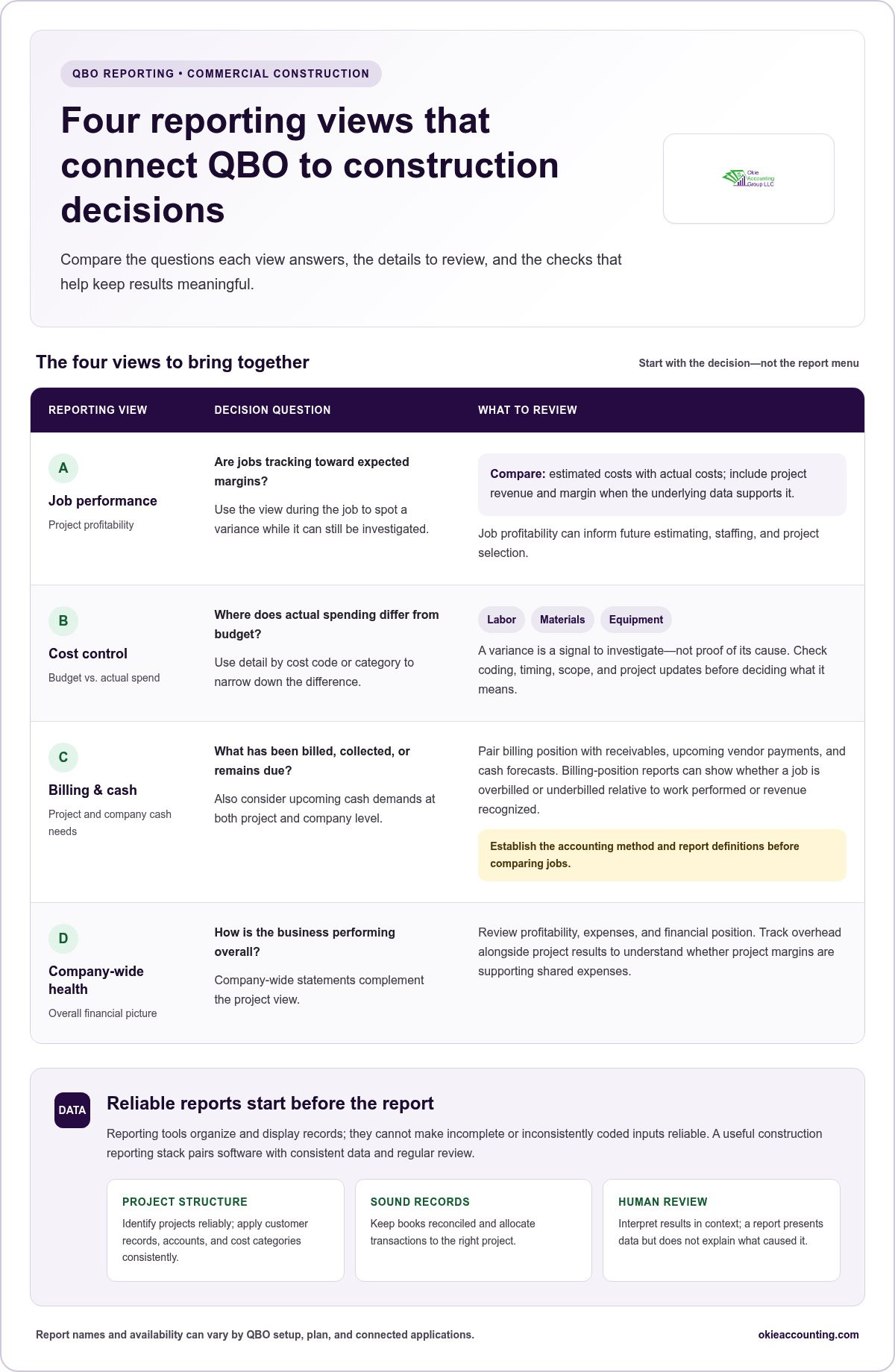
Prioritize reports by the decisions they support, not by how many options appear in a menu. A useful construction reporting setup connects four views: job performance, cost control, billing and cash, and company-wide financial health. Report names and availability can vary by QBO setup, plan, and connected applications, so confirm current capabilities before building a workflow around a specific report.
Job performance asks whether projects are meeting margin expectations; cost control asks where actual spending differs from budget; billing and cash reports show what’s earned, billed, collected, or due; company-wide statements show whether the business is financially healthy overall. This gives owners and project managers a shared framework for reviewing numbers and deciding what needs attention.
Which reports reveal job cost and profitability trends?
Job profitability reporting can compare estimated costs with actual costs and, when the underlying data supports it, show project revenue and margin. Reviewing those figures during the job helps teams spot a variance while there’s still time to investigate. Cost-code or cost-category detail can narrow the question: is the difference concentrated in labor, materials, equipment, or another budget area?
A variance is a signal to examine, not proof of its cause. Check the coding, timing, scope, and project updates before deciding what action to take. Consistent project information also matters for work-in-progress (WIP) and earned-revenue reporting. These views rely on suitable project data and accounting treatment, not simply a software-generated total. For context on construction accounting standards, consider how the chosen method affects the meaning and timing of reported results.
How do billing, cash, and overhead reports complete the picture?
Billing-position reports help show whether a project is overbilled or underbilled relative to the work performed or revenue recognized. The precise calculation depends on the accounting method and report definitions, so establish those before comparing jobs. Pair this view with receivables, upcoming vendor payments, and cash forecasts to see both project obligations and company-wide cash needs.
Job reports alone can obscure the cost of running the business. Track overhead alongside project results to understand whether margins are supporting shared expenses, and review vendor-payment timing to anticipate cash pressure. The construction cash flow management guide offers further context on forecasting. Builders looking to align reporting with a repeatable review process can also discuss their reporting needs with Okie Accounting Group LLC.
QBO reports, construction add-ons, spreadsheets, or dashboards: what fits?
QuickBooks Online can be a useful financial base without answering every project-level question on its own. For commercial builders, the right setup may pair native reports with tools that add project context or analysis. The best choice depends on project volume, reporting complexity, and the team’s capacity to maintain the data.
Use this comparison to narrow the options. Features, integrations, supported fields, and report functionality can change, so review current vendor documentation and test whether data maps correctly before relying on a tool.
When are QBO’s built-in reports a practical starting point?
Start with native reports if they can answer your core accounting and available project questions. Their usefulness depends on the QBO setup, consistent coding, user permissions, and current plan capabilities. Before expanding the stack, test sample outputs against real management questions. For example, check whether your team can review a project’s costs and revenue in a format that supports its regular decisions.
When might an add-on, spreadsheet, or dashboard add value?
A connected construction tool may contribute project context, but confirm which fields transfer and how they map. Spreadsheets suit flexible analysis when someone owns updates and version control. Dashboards can support recurring visibility when measures, source data, and review responsibility are defined.
If you’re weighing what are the best financial reporting tools for qbo for commercial builders?, don’t look for a universal winner. Choose the smallest dependable stack that answers your priority questions and that your team can maintain.
How can commercial builders choose and implement QBO reporting tools?
Choose reporting tools by working backward from decisions, then test whether the underlying data can support them. Before comparing features, list the reports you need and the project dimensions those reports should show, such as project, cost category, and reporting period. This keeps the selection grounded in construction workflows rather than feature lists.
Define the decisions. Identify what owners and project managers need to decide, such as responding to cost variances, reviewing billing position, or planning cash needs.
Inspect the data. Check whether QBO records consistently identify projects, customers, accounts, and cost categories. Note gaps that could distort comparisons.
Shortlist tool categories. Consider whether native QBO reporting is sufficient or whether project tools, spreadsheets, or dashboards address a specific reporting need.
Test real outputs. Use a completed project and an active one to examine cost, billing, and profitability views. Compare sample report totals with the relevant accounting records.
Assign ownership. Decide who maintains transaction coding, reconciles accounts, prepares reports, and reviews results. Include responsibility for integration upkeep if data moves between systems.
Set a review routine. Choose a recurring cadence that fits project activity and management needs. Adjust it if reports arrive too late or create work without informing decisions.
What should builders test before adopting a reporting tool?
Test whether project, cost-category, and period filters answer the questions your team actually asks. For example, can you isolate a project’s material costs for the period under review and compare them with the relevant budget? Validate report definitions and totals against accounting records, and check data synchronization, user permissions, and export requirements. Confirm functionality with current product documentation, since supported fields and capabilities can change.
How should reporting responsibilities and review cadence be set?
A report needs an owner and a clear handoff. Separate transaction entry and coding from reconciliation, report preparation, and management interpretation, even if one person handles multiple steps. Consistent staff workflows help protect the reliability of the output. QuickBooks training for contractors can help staff adopt the system and use it consistently.
For a dependable process, connect the reporting routine to bookkeeping work that keeps project records organized. If you’re deciding what are the best financial reporting tools for qbo for commercial builders?, a focused review of your reporting needs and workflow can help. Discuss your QBO reporting setup.
Turn QBO reports into decisions with construction-focused financial oversight
Software can generate a report, but dependable decisions require more than a report button. Reconciled books, consistently coded project costs, and clearly defined measures give builders a sound basis for reviewing job performance and company finances. If project costs are miscoded or account balances haven’t been reconciled, a polished dashboard can still present a misleading picture.
Reporting has two distinct stages: producing the numbers and interpreting them. A report may show that actual costs differ from budget, but management still needs to investigate the variance, assess its effect on projected margin, and decide whether staffing, purchasing, or cash plans need attention. Construction-focused bookkeeping helps maintain reliable records. Fractional controller oversight adds structure to budgeting, internal controls, and financial interpretation. Together, they complement reporting software rather than replace it.
What does ongoing reporting support add beyond software?
Monthly bookkeeping maintains organized records, includes monthly bank reconciliations, and supports the preparation of standard financial statements. Controller-level review builds on that foundation by examining results, budgets, and internal processes so leaders can understand trends and act on them. Builders who need higher-level financial oversight can explore fractional controller services. The goal is a repeatable cycle: maintain accurate books, produce meaningful reports, investigate key movements, and use the findings in management decisions.
How can a builder take the next step toward clearer reporting?
Start by naming the main gap. Is it job-cost detail, margin visibility, billing position, cash planning, or inconsistent reporting from one project to another? Then consider which decisions the information should support and where the current workflow creates confusion. A focused set of priorities makes it easier to assess whether the issue is the software, the underlying records, the review process, or a combination.
For builders asking, “what are the best financial reporting tools for qbo for commercial builders?”, tailored financial interpretation can connect tool selection to actual reporting needs. Okie Accounting Group LLC supports commercial builders with construction-focused bookkeeping, financial reporting, cash flow forecasting, and fractional controller services. Based in Tennessee, the firm provides remote support nationwide, including to builders in Jacksonville, Florida. A discovery conversation can focus on your existing QBO workflow, reporting gaps, and the decisions you want to make with greater confidence. Learn more about a reporting approach for your business.
Build a Reporting System Your Team Can Act On
The answer to “what are the best financial reporting tools for qbo for commercial builders?” isn’t one universal platform. It’s a setup that fits your projects, delivers dependable job and company-wide information, and gives your team a clear process for reviewing results. Native QBO reports, construction add-ons, spreadsheets, and dashboards can each play a role, provided the underlying records are accurate and consistently maintained.
Software produces reports; financial oversight helps turn them into decisions. Construction-focused monthly bookkeeping and financial reporting support organized, reconciled information, while QuickBooks setup and training help establish consistent workflows. Fractional controller support adds a higher-level perspective on budgeting, internal controls, and interpreting financial performance.
If project costs, margins, billing, or cash planning still feel difficult to see clearly, bring your current QBO workflow and reporting priorities to a discovery conversation. Book a discovery call with Okie Accounting Group LLC to discuss a reporting approach suited to your business. With the right data and review process in place, you can move forward with greater clarity and confidence.
Frequently Asked Questions
Can QuickBooks Online handle financial reporting for a commercial construction company?
Yes, QBO can provide a starting point for accounting reports, but its usefulness for construction reporting depends on setup, consistent project coding, and the reports available in your current plan and workflow. Test whether reports answer your job-cost, billing, and management questions. If you’re asking “what are the best financial reporting tools for qbo for commercial builders?”, consider whether native reports provide enough project context or need to be supplemented by connected tools and financial review.
What financial reports should commercial builders track in QBO?
Commercial builders commonly review job profitability, estimated-versus-actual costs, overhead, billing position, vendor payments, and company-wide financial statements. The right mix depends on how projects are structured, the accounting method, and the decisions management needs to make. Define the purpose of each report and confirm the underlying data is coded and reconciled consistently. That way, a variance or margin change becomes a prompt to investigate, not a conclusion based on unclear figures.
Which construction reporting tools integrate with QuickBooks Online?
Construction project or job-costing applications, spreadsheets, and business-intelligence dashboards are common categories to evaluate, but integration support varies by product version, plan, and data fields. Review current vendor documentation, then test a representative project before depending on connected reports. Confirm what information synchronizes, how often it updates, and whether totals reconcile to QBO. A connection alone doesn’t ensure project data is complete, mapped consistently, or ready for management decisions.
Is a separate construction reporting add-on necessary if a company already uses QBO?
No, an add-on isn’t always necessary. If your reporting needs are clear, project data is organized, and QBO reports answer your questions, you may be able to start with your current system. An add-on may help provide project context or repeatable reports your existing workflow lacks. Before adding one, weigh its value against integration upkeep, staff training, data ownership, and the work required to keep information consistent.
How can a builder compare job costs with estimates in QBO?
Use consistent project and cost-category structures for estimates, transactions, and project costs. Then compare estimated and actual costs for the same project and period using available QBO reports or a connected tool. Check that costs are allocated to the correct job and category before interpreting differences. Investigate variances rather than assuming their cause, and verify current report features and setup requirements against the builder’s QBO configuration.
Can financial reporting tools show whether a construction project is overbilled or underbilled?
They may show project billing in relation to costs or earned revenue, but the result depends on your accounting method, project data, and report definitions. First establish how your workflow defines overbilling and underbilling, then validate the calculation against accounting records. Review the underlying project information before acting on the result. Treat the report as a management signal that guides further review, not as a substitute for understanding the project’s financial position.
When should a commercial builder get help improving QBO financial reporting?
Consider support if reports don’t reconcile, project costs are inconsistently coded, margin changes are hard to explain, or staff spend too much time assembling spreadsheets. Construction-focused bookkeeping can strengthen the records behind reports, while fractional controller oversight can support interpretation and reporting processes. Okie Accounting Group LLC is based in Tennessee and provides remote support to construction businesses nationwide, including builders in Jacksonville, Florida, helping them work toward clearer financial information and more confident decisions.


Comments