
Automated Expense Tracking for Contractors: A Strategic 2026 Framework

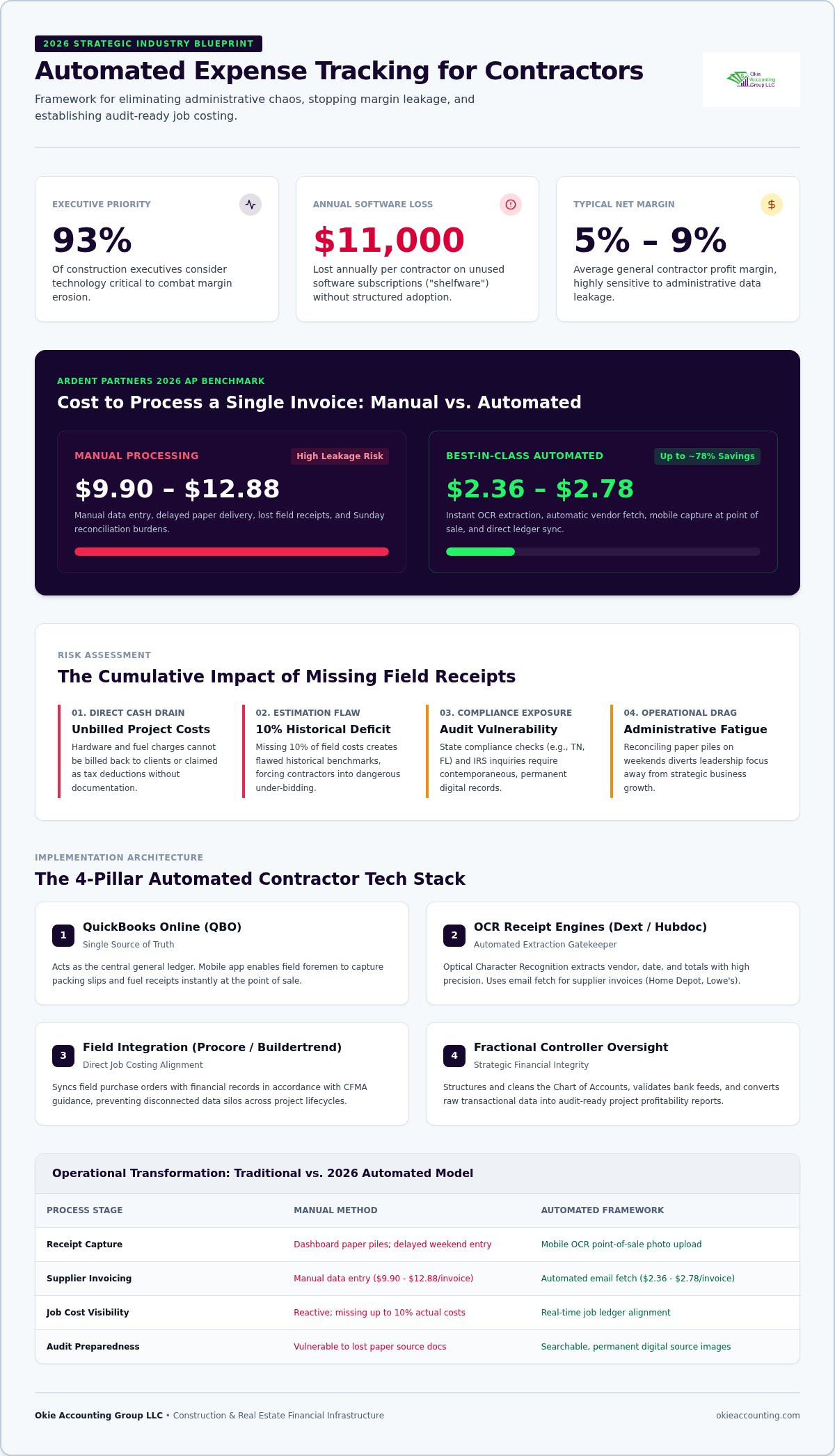
93% of construction executives consider technology critical to combat margin erosion, yet the average small-to-midsize contractor loses $11,000 every year on software subscriptions they pay for but never effectively adopt. According to the Intuit QuickBooks 2026 Construction Profitability Report, this waste often stems from the lack of a structured framework for automated expense tracking for contractors. You likely recognize the drain of spending your Sunday afternoons buried in a mountain of crumpled fuel receipts and subcontractor invoices instead of preparing for Monday's kickoff. It's frustrating to watch your project margins thin out simply because of unbilled expenses or manual data entry errors that could have been avoided.
We're here to change that trajectory. This guide will show you how to eliminate repetitive administrative tasks, capture every receipt at the point of sale, and protect your bottom line with rigorous financial oversight. This 2026 framework provides a disciplined roadmap to move your business from administrative chaos to a state of audit-ready operational clarity. We'll explore how to integrate field data directly into your job costing, ensuring your financial records are always ready for the next level of growth and stability.
Why Manual Expense Tracking is Eroding Your Construction Profit Margins
Automated expense tracking for contractors is more than a simple software upgrade. It's a structural framework that provides real-time financial visibility into every job site you manage. When you rely on manual systems, you aren't just dealing with an administrative burden; you're operating with a fragmented view of your business's health. This lack of clarity makes it impossible to protect your project margins against the "leakage" that occurs when costs aren't captured the moment they happen.
The financial impact of manual processing is staggering. Ardent Partners’ The State of AP 2026 reports that the average cost to manually process a single invoice ranges from $9.90 to $12.88. In contrast, best-in-class automated workflows reduce that cost to between $2.36 and $2.78 per invoice. For a general contractor managing multiple subcontractors and vendors, these administrative costs eat directly into net profit margins that typically hover between 5% and 9%. Implementing a disciplined job costing methodology ensures that every dollar is accounted for, allowing you to move from reactive data entry to proactive profit protection.
The Real Cost of Lost Receipts in Construction
Lost receipts are a direct drain on your cash flow. Every uncaptured hardware store run or fuel charge represents a tax deduction you can't claim and a project cost you can't bill back to the client. This leads to a dangerous cycle of under-bidding. If your historical data is missing 10% of your actual field costs, your future estimates will be fundamentally flawed. Beyond the math, the mental toll is significant. Spending your weekends reconciling crumpled receipts prevents you from focusing on strategic growth and high-level project management.
Audit Readiness and Financial Integrity
A digital trail is your best defense during an IRS inquiry or a state-level compliance check. In states like Tennessee and Florida, maintaining contemporaneous records is vital for business integrity and licensing requirements. Paper files are vulnerable to damage, loss, and simple human error. By shifting to a digital system, you ensure that every transaction is backed by a permanent, searchable image of the source document. This level of organization is a core component of professional Construction Bookkeeping Services, turning your financial records into a reliable asset rather than a source of stress. Digital records prove your expenses are legitimate, protecting you from the risks of delayed reporting and audit vulnerabilities.
The 2026 Tech Stack for Automated Contractor Bookkeeping
Building a professional-grade ecosystem for automated expense tracking for contractors requires more than just downloading a few apps. It's about creating a disciplined framework where field data flows seamlessly into your financial reports without creating disconnected silos. In 2026, the most successful firms use a "single source of truth" model, ensuring that every dollar spent on a job site is instantly visible in the general ledger. This structured approach eliminates the $11,000 average annual loss many contractors face due to "shelfware"-software they pay for but never fully adopt.
QuickBooks Online: The Heart of Your System
As Intuit continues to sunset legacy desktop support, QuickBooks Online (QBO) has become the non-negotiable foundation for project-based accounting. The cloud-native environment allows your field superintendents to access critical data on-site while your office team manages the ledger in real time. By using the QBO mobile app, a foreman can snap a photo of a packing slip or fuel receipt the moment it's handed to them. This immediate capture prevents the data "leakage" that occurs when receipts are left to fade on a truck dashboard. For a deep dive into optimizing your settings for 2026, see our guide on QuickBooks for Contractors.
OCR and Receipt Capture: Eliminating Data Entry
Modern automated expense tracking for contractors relies on Optical Character Recognition (OCR) technology found in tools like Dext or Hubdoc. These platforms act as a digital gatekeeper for your business. When you upload a receipt, the OCR engine reads the vendor name, date, and total amount with high precision. This removes the need for manual typing and significantly reduces human error. You can also set up an "email fetch" feature to automatically pull digital invoices from suppliers like Home Depot or Lowe’s. This ensures your records are always current without you having to lift a finger.
For larger operations, integrating specialized platforms like Procore or Buildertrend adds another layer of project control. These tools don't replace your ledger; they enhance it by syncing field purchase orders with your financial records. Following Construction Financial Management Association guidance is essential here to ensure these systems maintain accuracy across the project lifecycle. While bank feeds offer a convenient way to pull in transactions, "Auto-Categorization" is often a myth that leads to messy books. Without professional oversight, software might mislabel a "Project Material" purchase as "Office Supplies," distorting your job costing. If you're unsure if your current tools are properly integrated, you can schedule a discovery call to review your financial infrastructure.
Beyond Data Entry: Automating Job Costing and Project Profitability
Automated expense tracking for contractors provides the raw data, but the true value lies in how that data is structured to protect your project margins. While general bookkeeping tracks what you spent, job costing tracks where you spent it and why. Without this distinction, your financial reports remain a vague overview of your bank balance rather than a strategic tool for growth. Top-quartile construction firms that leverage real-time job costing report pre-tax net margins averaging 10% to 12%, significantly higher than the 5% to 9% industry average for residential and commercial builders.
A disciplined approach starts with your Chart of Accounts. Many contractors make the mistake of lump-summing purchases into generic categories like "Office Supplies" or "Small Tools." A professional-grade automation system distinguishes between overhead and "Project Materials." This allows for real-time "Actual vs. Estimated" reporting, giving you the ability to identify cost overruns while the crew is still on-site rather than weeks after the job is closed. When your automated labor tracking integrates directly with your expense reports, you gain a comprehensive view of the total investment required for every project milestone.
Assigning Expenses to Project Codes
The transition from data entry to strategic oversight requires a system where every receipt is tagged to a specific job code at the moment of capture. When a field superintendent uses a mobile app to snap a photo of a material invoice, they must assign it to the correct project immediately. This discipline ensures that your Management Accounting reports accurately reflect the financial health of every active site. By establishing this foundational system, you move away from "gut feel" decision-making and toward a data-driven model that identifies which types of jobs are actually driving your firm's profitability.
Tracking Reimbursable Expenses Without the Headache
Job costing is the process of tracking costs to specific projects to determine true profitability. One of the most common points of friction in construction accounting is the delay between field spending and office billing. Automation solves this by allowing you to mark expenses as "Billable" the moment they're recorded. This ensures that every reimbursable cost, from specialized equipment rentals to emergency supply runs, is automatically pulled into the next client invoice. This workflow reduces the risk of unbilled expenses and ensures that your cash flow remains steady throughout the project lifecycle. It's a simple checkbox that prevents thousands of dollars in billable costs from slipping through the cracks each year.
Step-by-Step: Implementing an Automated System That Actually Works
Successfully implementing automated expense tracking for contractors requires a methodical rollout rather than a "plug-and-play" mentality. Many firms fail because they overlay new software on top of a messy, disorganized foundation. To achieve true financial clarity, you must follow a disciplined sequence that prioritizes structural integrity over speed. This ensures your data remains reliable enough to drive high-level business decisions.
The transition begins with a deep clean of your existing Chart of Accounts. Generic accounting templates often lack the granularity needed for construction-specific reporting, such as distinguishing between equipment rentals and consumable materials. Once your ledger is properly structured, you can select and integrate your receipt capture tool with QuickBooks Online. This creates a direct bridge between field purchases and your financial records, eliminating the manual entry lag that distorts your cash flow reports. However, the software is only as effective as the human systems supporting it.
Establishing the Field Workflow
The most sophisticated automation will fail if your field crew doesn't buy into the process. You must establish a clear, non-negotiable expectation: "No digital receipt, no reimbursement." While some project managers may resist new technology, showing them how much time they'll save on Sunday afternoons usually wins them over. Providing professional Software Training for your staff is essential to ensure they understand the "how" and the "why" of project-specific tagging. When your team sees that accurate data entry leads to better-resourced job sites, compliance becomes a matter of professional pride rather than a chore.
The Weekly Review Process
Automation is not a "set it and forget it" solution. It's a tool that requires regular calibration. We recommend a weekly review process to catch categorization errors before they hit your Profit and Loss statement. During this time, your office team should check for duplicate entries and verify that bank rules are firing correctly. This proactive approach prevents "Garbage In, Garbage Out" scenarios that can lead to costly mistakes during tax season or project audits. Reconciling your accounts monthly remains a vital step to verify the automated data against your actual bank statements, ensuring your financial readiness is always at 100%.
Establishing these foundational systems is the first step toward reclaiming your time and protecting your profits. If you're ready to move away from manual spreadsheets and toward a professional-grade financial framework, you can book a discovery call to discuss a customized implementation plan for your firm.
Strategic Oversight: Why Automation Needs a Fractional Controller
While software provides the engine for automated expense tracking for contractors, it doesn't provide the map. In 2026, the distinction between administrative data entry and strategic financial management is sharper than ever. Software is designed to capture information, but it cannot understand the nuances of a complex Work-in-Progress (WIP) schedule or the implications of an over-billing trend. Without professional oversight, automation can lead to "Garbage In, Garbage Out" at an accelerated pace. A Fractional Controller acts as your strategic partner, ensuring that the foundational systems we've discussed are not just functional, but optimized for long-term profit protection.
Okie Accounting Group LLC builds the structural framework that makes automation effective. We move beyond traditional bookkeeping, which focuses solely on historical records, and transition into controlling, which focuses on future strategy. This shift is vital for contractors who want to protect their margins from the 14% to 20% invoice exception rates typical of manual, decentralized systems. By applying rigorous management principles to your automated data, we turn raw numbers into a protective shield for your business's financial health.
Interpreting the Data for Growth
Data is only valuable if it informs action. A controller uses your expense data to identify under-performing project types that may be eroding your overall profitability. For firms operating in the competitive Tennessee and Florida markets, accurate cash flow forecasting is essential for managing the gaps between project milestones and payroll obligations. You can learn more about this high-level approach in our guide on Fractional Controller Services. We help you use real-time job costing to ensure you're bidding based on reality, not just optimism.
Your Next Steps Toward Financial Clarity
The path to mastering automated expense tracking for contractors usually begins with a professional QuickBooks cleanup. Starting an automation journey with messy books only compounds existing errors. By refining your Chart of Accounts and reconciling legacy data, you establish a baseline of accuracy. This transition allows you to step away from the role of a job site manager and embrace the identity of a strategic business owner. You'll gain the confidence to make data-driven choices that support sustainable scaling and long-term stability.
Establishing these systems isn't just about saving time; it's about building an asset that can scale without breaking. If you're ready to stop wrestling with spreadsheets and start building a robust financial infrastructure, we're here to guide you. You can book a discovery call today for a personalized structural assessment of your firm's specific needs.
Secure Your Profit Margins with a Foundational Framework
Transitioning to automated expense tracking for contractors is a critical step toward protecting your firm's long-term health. By moving away from manual data entry and embracing a disciplined digital workflow, you eliminate the financial leakage that erodes project margins. We've established that software alone is not a strategy; it requires a clean Chart of Accounts and rigorous job costing to provide the real-time visibility you need to scale. This structural approach ensures your records are always audit-ready and your project estimates are grounded in accurate, historical data.
As a QuickBooks Online Certified ProAdvisor and specialized partner in the construction and real estate industry, Okie Accounting Group focuses on high-level strategic financial oversight. We don't just manage your data; we help you interpret it to drive growth. It's time to stop spending your weekends on spreadsheets and start leading your business with quiet confidence. You can schedule your discovery call to build your financial framework and take the first step toward operational clarity. Your business deserves a partner as invested in its success as you are.
Frequently Asked Questions
What is the best expense tracking app for construction companies in 2026?
The best application is one that integrates seamlessly with your general ledger to maintain structural integrity. In 2026, tools like Dext and Hubdoc lead the market because of their high-precision OCR technology. These apps allow field crews in Tennessee and Jacksonville to snap photos of receipts that sync directly with QuickBooks Online. This ensures that no data is lost between the job site and the office, protecting your project margins from the start.
Can I use QuickBooks Online to track job costs automatically?
Yes, QuickBooks Online Plus and Advanced tiers support automated job costing when configured correctly. By utilizing the "Projects" feature, you can track income and expenses against specific contracts in real time. This automation allows for "Actual vs. Estimated" cost reporting without manual spreadsheet updates. Professional setup is essential to ensure that your Chart of Accounts is structured for construction-specific reporting, preventing categorization errors that could distort your overall project profitability.
How do I get my field crew to actually use receipt capture apps?
Successful adoption starts with clear expectations and professional software training for your staff. You should establish a firm "no receipt, no reimbursement" policy to drive compliance across your team. When project managers see that automated expense tracking for contractors saves them hours of weekend paperwork, they're much more likely to buy in. Focus on the simplicity of the workflow; a quick photo at the point of sale is all it takes.
Is automated expense tracking secure for small business contractors?
Modern cloud-based systems offer enterprise-level security that far exceeds the safety of physical paper files. Platforms like QuickBooks Online use advanced encryption to protect your financial data from unauthorized access. Additionally, digital receipt capture creates a permanent, searchable audit trail that satisfies IRS requirements. This level of security is vital for contractors in Florida and Tennessee who need to maintain financial integrity while managing decentralized teams across multiple active job sites.
Do I still need a bookkeeper if I automate my expense tracking?
Automation is a powerful tool, but it doesn't replace the need for professional oversight. While software handles the data entry, a specialized bookkeeper or fractional controller ensures the data is accurate and strategically categorized. They manage complex reconciliations, verify bank rules, and interpret reports to drive business growth. Automation allows your accounting partner to focus on high-level strategy rather than administrative tasks, moving your firm from simple history-tracking to future-focused planning.
How does automated tracking help with 1099 reporting for subcontractors?
In 2026, the IRS reporting threshold for Form 1099-NEC has increased to $2,000. Automated systems track these payments throughout the year, ensuring you stay compliant with the mandatory electronic filing mandate for businesses with ten or more aggregate returns. By capturing subcontractor invoices digitally, you maintain a clear record of payments and W-9 information. This preparation simplifies the year-end process and prevents the stress of hunting down missing data during a busy tax season.
What happens if I lose a physical receipt but have a digital copy?
The IRS has accepted digital images of receipts as valid documentation since 1997, provided they are legible and contain all necessary transaction details. If you lose the original paper copy, your digital record remains a legally sufficient proof of purchase. This is why immediate field capture is so important. Once a receipt is uploaded to your automated system, the physical paper becomes redundant, reducing clutter and the risk of losing valuable deductions.
How much does it cost to set up a professional automated accounting system?
The cost of implementation varies based on the complexity of your current books and the number of active projects. A professional setup typically includes a one-time fee for software configuration and personalized instruction sessions. While subscription costs for QuickBooks Online Plus have adjusted to $140 per month in 2026, the return on investment comes from eliminating manual entry errors. Investing in a structured framework now prevents the "shelfware" waste that plagues many growing firms.


Comments