
Fixing QuickBooks Mistakes for Contractors: A 2026 Strategic Cleanup Guide
- Wendy Okie

- Jun 4
- 12 min read
Updated: 6 days ago
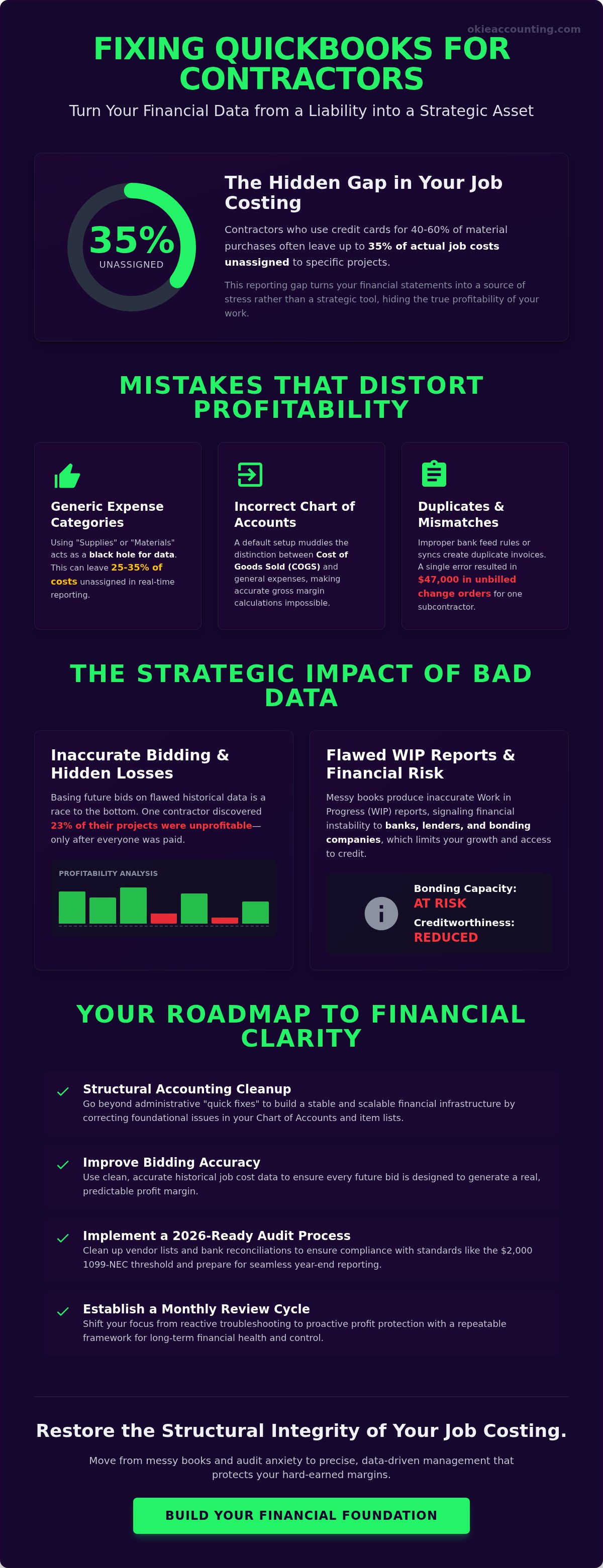
Did you know that contractors who use credit cards for 40% to 60% of their material purchases often leave up to 35% of their actual job costs unassigned to specific projects? This gap in real-time reporting turns your financial statements into a source of stress rather than a strategic asset. You likely recognize the frustration of looking at a profit report that doesn't match the reality of your bank account. Fixing QuickBooks mistakes for contractors is about more than just correcting typos; it's about restoring the structural integrity of your job costing to protect your hard-earned margins.
You deserve a financial system that provides clarity during high-stakes bidding and total control over your project data. This guide will show you how to identify, troubleshoot, and permanently resolve the specific errors that cause inaccurate reporting and audit anxiety. We'll explore a methodical approach to cleaning up your ledger, ensuring your records align with current 2026 standards like the $2,000 1099-NEC reporting threshold, and building a repeatable framework for long-term financial health. By the end, you'll have a roadmap to move from messy books to precise, data-driven management.
Key Takeaways
Identify the specific data entry errors, such as miscategorized job costs and bank feed duplicates, that distort your real-time profitability.
Discover how fixing QuickBooks mistakes for contractors directly improves your bidding accuracy and the reliability of your Work in Progress (WIP) reporting.
Learn why a structural accounting cleanup is more effective than administrative "quick fixes" for building a stable and scalable financial infrastructure.
Implement a 2026-ready audit process for your vendor lists and bank reconciliations to ensure your data is ready for year-end reporting.
Establish a repeatable monthly review cycle that shifts your focus from reactive troubleshooting to proactive profit protection.
Common QuickBooks Mistakes That Distort Contractor Profitability
Construction accounting is inherently complex. Unlike standard retail or service businesses, your financial health depends on the precision of project-based data. When your financial foundation is built on generic data entry rather than project-specific tracking, your profitability reports become a liability. Fixing QuickBooks mistakes for contractors requires a shift from simple bookkeeping to strategic data management. If your labor, materials, and overhead aren't mapped correctly, you aren't just looking at messy books; you're looking at a distorted view of your company's survival.
A frequent culprit is an incorrectly mapped Chart of Accounts. Many contractors rely on a default setup that muddies the distinction between Cost of Goods Sold (COGS) and general administrative expenses. This lack of structural integrity makes it impossible to calculate an accurate gross margin. While you don't necessarily need a full-scale forensic accounting investigation, a strategic cleanup requires the same level of attention to detail to uncover hidden leaks in your cash flow. Without reconciling every bank and credit card account to the penny, "ghost" balances will continue to hide missing deductions and unrecorded expenses.
The Danger of Generic Expense Categorization
Using broad categories like "Supplies" or "Materials" is a significant risk for a scaling construction company. These generic buckets act as a black hole for project data. If you spend several thousand dollars at a vendor but fail to assign those costs to a specific job, your project-level profitability is immediately compromised. Research shows that contractors who use journal entries to "clean up" statements at month-end can leave 25% to 35% of actual job costs unassigned in real-time reporting. A properly structured QuickBooks Setup & Training session ensures that every dollar spent is linked to the correct project from the start.
Duplicate Invoices and Payment Mismatches
Duplicate entries often stem from improper bank feed rules or overlaps between manual entries and third-party integrations. For instance, if you use a project management tool to sync invoices, it's easy to "double-count" an expense if the bank feed isn't matched correctly. This creates artificial accounts receivable balances and a cluttered balance sheet, particularly in the "Undeposited Funds" account. These errors can be costly; one subcontractor discovered that a single QuickBooks error resulted in $47,000 in unbilled change orders. For businesses facing these deep-seated data issues, Fractional Controller Services provide the disciplined oversight required to restore balance sheet integrity and ensure every payment is applied accurately.
The Strategic Impact: Why Bad Data Is More Than a Bookkeeping Headache
Operating a construction company with messy books is like navigating a job site in total darkness. You might move forward, but the risk of a catastrophic misstep is ever-present. While many owners view bookkeeping as a back-office chore, the reality is that your financial data is the primary engine for your strategic decisions. Fixing QuickBooks mistakes for contractors is not merely about aesthetic organization; it is about ensuring the structural integrity of your business's future. When your ledger is cluttered with unallocated costs or inaccurate job data, you lose the ability to see where you are actually making money.
Clean financials provide the necessary transparency to move from reactive survival to proactive growth. This clarity is essential for managing the specialized accounting methods for effective financial management that the construction industry demands. Without it, you cannot accurately assess your overhead, your labor burden, or your true project margins. Restoring your financial foundation allows you to drive data-backed decisions that protect your cash flow and ensure long-term stability.
Inaccurate Job Costing and Future Bid Risk
Your historical project data is the most valuable tool in your estimating arsenal. If your QuickBooks file doesn't reflect the actual costs of past projects, your future bids are based on fiction. One general contractor discovered that 23% of their projects were unprofitable, yet this reality only surfaced after the workers and vendors were already paid. This lag in data prevents you from adjusting your pricing to cover rising material costs or labor inefficiencies. When you rely on flawed data to set your prices, you are essentially participating in a race to the bottom where the prize is a project that drains your cash reserves. Accurate job costing ensures that every bid you submit is designed to generate a real profit.
WIP Accounting and Financial Readiness
For contractors looking to scale, the Work in Progress (WIP) report is the ultimate litmus test for financial health. Banks, lenders, and bonding companies rely on these reports to determine your creditworthiness and bonding capacity. If your QuickBooks file contains errors in revenue recognition or over/under billings, your WIP report will be fundamentally flawed. Messy books signal to lenders that your business lacks the discipline required for high-value contracts. Establishing a framework for Construction Bookkeeping Services is the only way to ensure your financial statements are ready for external scrutiny. Accurate WIP reporting allows you to identify when you have billed ahead of your costs or when you are "financing" a project for an owner, which is critical for maintaining a healthy cash position.
If you are tired of second-guessing your numbers before every big bid, it may be time to professionalize your oversight. You can schedule a discovery call to discuss how to turn your financial data into a strategic advantage.
DIY Cleanup vs. Professional Controller Oversight
It's a common trap. Many business owners believe that correcting a few entries in the bank feed constitutes a complete cleanup, but this often ignores the underlying imbalances in the general ledger. Fixing QuickBooks mistakes for contractors requires more than just administrative data entry; it demands a structural understanding of how every transaction flows through your financial ecosystem. A "quick fix" might hide a symptom, but it rarely cures the underlying disease of inaccurate data. When you attempt to patch errors without a strategic framework, you often create a cascade of imbalances that only surface later during a critical audit or bank review.
The ROI of professional controller services isn't just found in cleaner reports. It's found in the identification of structural efficiencies and potential tax savings that DIYers often miss. While we don't provide tax preparation, our oversight ensures your books are in a state of financial readiness that allows your CPA to maximize your deductions without wading through a year of mess. Professional oversight transforms your accounting from a historical record into a forward-looking tool for profit protection.
The Limitations of the "Wait and See" Approach
Waiting until year-end to let your CPA "fix" everything is a costly strategy. By the time April 15 rolls around, the opportunity to make data-driven adjustments to your projects has already passed. This reactive stance often leads to higher professional fees and the risk of permanent data corruption within QuickBooks Online. Transitioning from reactive cleanup to proactive management accounting allows you to catch errors in real-time. This ensures your financial data remains an accurate reflection of your operational reality throughout the entire fiscal year, not just after a frantic year-end adjustment.
Identifying When Your Books Are Beyond DIY
There are clear red flags that signal your financial data has moved beyond the scope of a simple DIY cleanup. If you see negative bank balances on your screen that don't exist in reality, or if major projects are showing $0 profit despite your crews being busy, your system is broken. Multi-year projects and complex retainage tracking present unique challenges that standard bookkeeping often fails to handle correctly. In these cases, a professional QuickBooks setup for contractors is the best preventative measure. It builds the necessary guardrails into your system, ensuring that retainage is tracked accurately and that project-specific losses are identified before they compromise your company's stability.
Step-by-Step Fixes for Common Contractor QuickBooks Errors
Fixing QuickBooks mistakes for contractors involves a systematic reversal of data decay. You must begin by reconciling every bank and credit card account to the penny for the current fiscal year. This foundational step ensures that your cleanup efforts are based on verified bank data rather than speculative entries. Once reconciled, your next priority is to scrub the "Uncategorized Expenses" account. These entries often represent material purchases or subcontractor payments that should be reassigned to specific projects to restore your margin visibility. To identify deeper issues, run a Profit and Loss by Customer report. This specific view allows you to spot outliers where costs were accidentally allocated to the wrong client or where a project shows high revenue with zero associated costs.
Fixing Missing or Wrong 1099 Amounts
Ensuring compliance for the 2026 tax season requires a meticulous audit of your Vendor list. You must verify that the "Track 1099" box is checked within the profile of every eligible subcontractor. A frequent error occurs when payments are made from an account that isn't mapped to a 1099 category in your QuickBooks settings. While you may be accustomed to the historical $600 limit, you must update your internal 2026 workflows to reflect the new $2,000 reporting threshold for Form 1099-NEC. This change is critical for maintaining accurate records and avoiding unnecessary filing for smaller vendors.
Cleaning Up Your Job Costing Structure
If your labor and materials are appearing in general expense categories instead of project-specific COGS, use the "Reclassify Transactions" tool to perform bulk fixes. This feature allows you to move hundreds of entries to the correct project or account in a single action, saving hours of manual entry. For contractors, the distinction is simple: an "Item" is the specific service or material you are tracking, while an "Account" is the structural category on your Chart of Accounts where that value is stored. Ensuring your service items are mapped to the correct COGS accounts is the only way to achieve true project-level profitability tracking.
Resolving Integration Sync Failures
Many contractors face "orphaned" transactions that fail to sync from project management tools to QuickBooks. This usually happens when cost codes in your field software aren't perfectly mapped to your QuickBooks Chart of Accounts. You should check your integration logs weekly for errors and manually match any transactions that were left behind to prevent data gaps. Building a sync-proof workflow is easier when you invest in QuickBooks training for contractors to align your systems. If your books feel like a tangled web of sync errors and mismapped accounts, book a discovery call today to discuss a professional structural cleanup.
Transitioning to a Profit Protection Framework
Fixing QuickBooks mistakes for contractors is a necessary repair, but it shouldn't be a recurring event in your business cycle. If you find yourself constantly cleaning up the same data entry errors, your company lacks a scalable financial infrastructure. Transitioning to a profit protection framework means building disciplined systems that identify anomalies before they distort your profitability. This strategic shift transforms your accounting from a simple historical record into a powerful asset for data-driven management. It's about moving from a state of financial complexity to one of operational clarity and confidence.
Establishing Monthly Reconciliations and Reviews
A robust framework relies on a zero-tolerance policy for unreconciled accounts. Every bank statement, credit card transaction, and payroll entry must match your ledger by the end of each month. When you review your Profit and Loss (P&L) and Balance Sheet monthly, you catch misallocations while the project details are still fresh in your mind. This proactive oversight prevents the data decay that typically leads to year-end stress. Through targeted software training, your team can learn to maintain these clean data standards. This ensures that your financial reporting remains a reliable reflection of your project margins and overall cash position.
The Okie Accounting Group LLC Approach to Strategic Growth
At Okie Accounting Group LLC, we make a clear distinction between basic administrative bookkeeping and the construction of a comprehensive structural framework. We focus on profit protection. We don't just record where your money went; we provide the clarity you need to decide where it should go next. By turning your cleaned-up QuickBooks file into a strategic weapon for bidding, you can pursue new contracts with the confidence that your overhead and labor costs are accurately accounted for. This level of professional oversight ensures your business remains resilient against market fluctuations and internal errors. We act as your strategic partner, helping you move beyond simple data entry to high-level financial health.
If you are ready to stop managing by intuition and start managing by accurate data, the next step is simple. You can schedule a discovery call today. Together, we can build a custom financial framework that protects your hard-earned margins and supports your long-term stability.
Building a Foundation for Scalable Growth
Restoring the structural integrity of your financial data is the first step toward long term stability. You've learned that fixing QuickBooks mistakes for contractors is about more than just administrative cleanup; it's about ensuring your bidding is accurate and your WIP reports are ready for lenders. By moving away from reactive patches and adopting a profit protection framework, you secure your margins against the hidden leaks that drain cash flow. We provide specialized expertise in construction and real estate accounting, offering fractional controller services that turn your ledger into a strategic asset. Our cloud-based accounting systems are designed for scalability, providing the high level oversight you need to grow with confidence.
You don't have to navigate these complex financial requirements alone. Whether you're troubleshooting integration sync failures or restructuring your Chart of Accounts, professional guidance ensures the job is done right the first time. Book a discovery call to fix your QuickBooks mistakes and protect your profits. Taking control of your financial data is the most important project you'll manage this year. We're ready to help you build a more profitable future.
Frequently Asked Questions
Why are my contractors not showing up on my 1099 report in QuickBooks?
Contractors usually fail to appear because the "Track 1099" box isn't checked in their vendor profile or their total payments haven't reached the 2026 reporting threshold of $2,000. You must also ensure the expense accounts used for their payments are mapped to the correct 1099 boxes in your company settings. If you paid them via credit card, those payments are reported by the card processor rather than your business, so they won't show on your internal 1099-NEC report.
How do I fix job costs that were assigned to the wrong project?
You can reassign misallocated costs by using the Reclassify Transactions tool found in the Accountant view of QuickBooks. This feature allows you to select multiple transactions at once and move them to the correct customer or project. If you don't have access to this tool, you must open each individual transaction and manually update the "Customer/Project" field. This ensures your project profitability reports reflect actual job site spending rather than administrative errors.
What is the fastest way to clean up several months of messy QuickBooks data?
The fastest approach to fixing QuickBooks mistakes for contractors involves reconciling your bank and credit card accounts to the penny before addressing individual transactions. Once your balances match your statements, you can use bulk reclassification tools to clean up the Chart of Accounts and assign uncategorized expenses to projects. Establishing a structural cleanup prevents you from wasting time on granular edits that don't impact your final financial integrity.
Can I use QuickBooks Online for construction job costing?
You can use QuickBooks Online for job costing provided you use the "Plus" or "Advanced" plans, as lower tiers lack the necessary "Projects" feature. The Plus plan, priced at approximately $115 per month in 2026, allows you to track labor, materials, and overhead on a per project basis. This setup is essential for generating accurate profitability reports and managing your Work in Progress (WIP) data effectively to protect your margins.
How do I handle retainage in QuickBooks so my reports stay accurate?
To handle retainage accurately, you must create specific "Retainage Receivable" and "Retainage Payable" accounts on your Chart of Accounts. When you invoice a client, use a service item mapped to the Retainage Receivable asset account to track the portion of the contract held back. This method keeps these funds off your immediate income statement while ensuring your balance sheet reflects the total value of your contracts and future cash inflows.
Why does my bank balance in QuickBooks not match my actual bank statement?
A mismatch usually occurs due to duplicate entries in the bank feed or transactions that were manually entered but never matched to a bank statement. You may also have "ghost" balances from uncashed checks or deposits that were recorded but never actually hit the bank. Performing a formal reconciliation is the only way to identify these discrepancies and ensure your cash flow forecasting relies on verified, real world data.
What should I do if my project management software is double-syncing invoices?
Double syncing often happens when both your project management tool and your bank feed create separate transactions for the same expense. You should adjust your integration settings to ensure that the sync only creates an "Invoice" or "Bill" while your bank feed is used strictly to "Match" the payment. Reviewing your bank feed rules will help prevent the software from automatically creating new entries that overlap with your project management data.
Is it better to fix my own QuickBooks mistakes or hire a professional?
Hiring a professional is better when your errors involve structural issues like mismanaged job costing or unreconciled years of data. While you can fix minor typos, a Fractional Controller provides the strategic oversight needed to ensure your financial infrastructure is scalable and audit ready. Professional cleanup identifies the root causes of data decay and establishes a repeatable system that protects your future project margins and business stability.


Comments