_edited_edited.jpg)

Mastering QuickBooks for Contractors: The 2026 Strategic Guide

With construction material costs remaining 42 percent above pre-pandemic levels as of April 2026, the margin for error in your project estimates has effectively vanished. Many firms still treat QuickBooks for contractors as a simple digital ledger rather than the profit-protection engine it was designed to be. You likely feel the daily pressure of shrinking margins and the constant headache of a messy Chart of Accounts that makes job costing feel like guesswork. It's exhausting to track subcontractor payments and compliance while trying to keep up with the 2026 tax law changes introduced by the One Big Beautiful Bill Act.
This guide will show you how to transform your financial setup into a robust structural framework that delivers real-time profitability data and lender-ready statements. We'll explore the critical 2026 software updates, the strategic configuration of job-costing workflows, and the methods for automating payroll and compliance. By moving beyond basic administrative tasks, you can establish the financial readiness required to navigate labor shortages and fluctuating costs with quiet confidence.
Key Takeaways
Establish a specialized Chart of Accounts to avoid the "garbage in, garbage out" trap that results from using generic retail or service-based software configurations.
Evaluate whether the mobility of QuickBooks Online or the robust reporting power of Desktop Enterprise is the better engine for your firm's specific project needs.
Leverage the "Project" feature within QuickBooks for contractors to monitor real-time profitability and identify budget variances before they erode your margins.
Shift from simple administrative bookkeeping to a comprehensive profit-protection system by integrating high-level oversight and fractional controller services.
Why Generic QuickBooks Setups Fail the Construction Industry
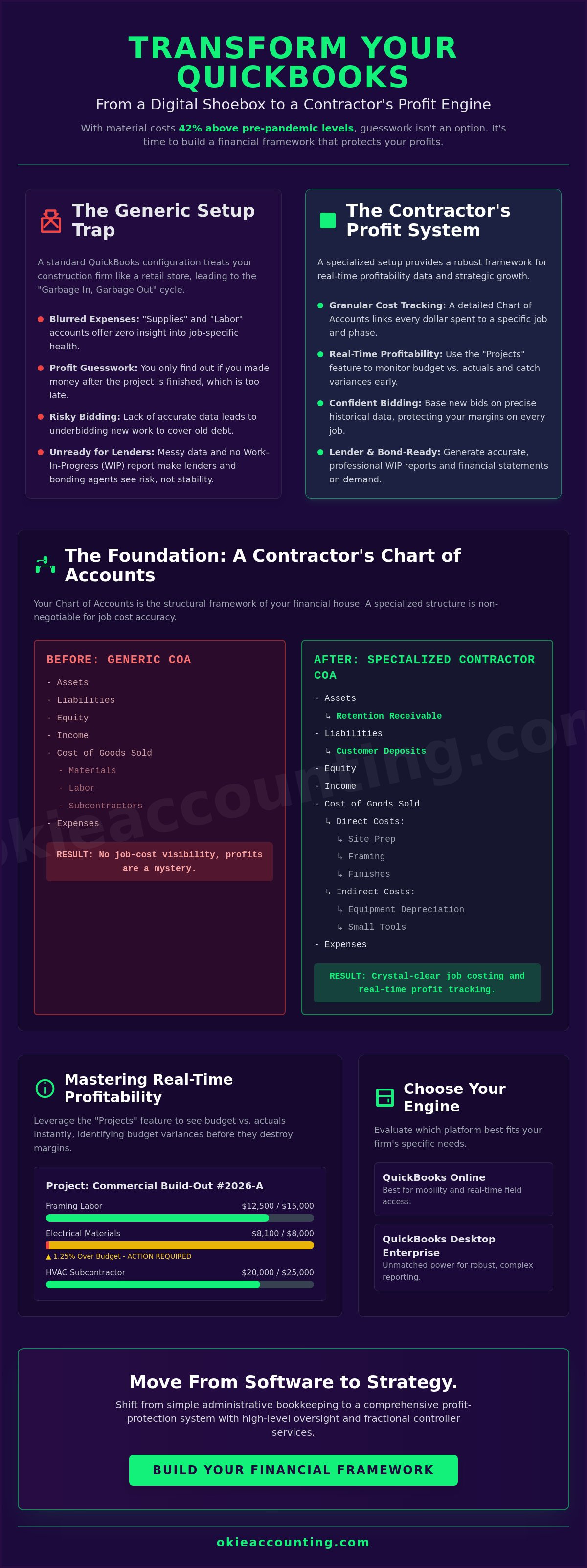
Many construction firms treat their accounting software as a digital shoebox for receipts. While a standard retail setup works for a business selling static inventory, it fails the moment you introduce labor burden, equipment depreciation, and fluctuating material costs. A generic configuration of QuickBooks for contractors lacks the structural integrity required to track these moving parts. Without a specialized Chart of Accounts, your expenses become a blurred mass of "Supplies" and "Labor" that offers zero insight into project-specific health.
The "garbage in, garbage out" principle is particularly brutal in construction. If your data entry is inconsistent, your profit margins become a fiction. You might see a healthy bank balance today, but without proper revenue recognition, you could be spending tomorrow's payroll on today's overhead. With material costs sitting 42% higher than pre-pandemic levels as of early 2026, a single bidding error can wipe out your annual profit. This lack of visibility leads to a dangerous cycle: underbidding new work to cover old debt. True financial infrastructure goes beyond simple bookkeeping; it creates a system where every dollar spent is tied back to a specific phase of a specific contract.
The Complexity of Project-Based Accounting
Construction accounting isn't just about tracking what you spend. It requires a deep understanding of Job costing to ensure each project carries its own weight. Generalist bookkeepers often overlook nuances like retainage, which can represent your entire profit margin on a job. When your data is messy, lenders and bonding agents see risk instead of stability. They need to see a Work-In-Progress (WIP) report that reflects reality, not a best-guess estimate. Accurate reporting ensures you're ready for growth rather than just reacting to the next crisis.
Identifying Your Financial Readiness
You'll know your current system is failing when you can't answer basic questions about your cash flow without digging through spreadsheets for hours. If you find yourself waiting until the end of a project to see if you actually made money, you're operating in the dark. Transitioning to strategic oversight means moving from "doing the books" to analyzing Key Performance Indicators (KPIs) like slippage and labor efficiency. High-level QuickBooks for contractors management allows you to spot red flags early, transforming your financial data into a roadmap for growth. Establishing this foundation is the first step toward the profit protection your business deserves.
Building Your Financial Foundation: The Contractor’s Chart of Accounts
The Chart of Accounts (COA) is the structural framework of your financial house. While generic software setups offer a flat list of accounts, a professional configuration of QuickBooks for contractors requires a multi-tiered approach to capture the movement of money through a project life cycle. You need specialized parent accounts that reflect construction reality. For instance, your Assets should include "Retention Receivable" to track funds held back by owners, while your Liabilities must account for "Customer Deposits" to avoid treating unearned revenue as immediate profit. Without these distinctions, your balance sheet will never accurately reflect your firm's true liquidity.
Structuring your Cost of Goods Sold (COGS) by project phase is where financial clarity begins. Instead of a single, bloated "Materials" account, you should utilize sub-accounts for specific stages like Site Prep, Framing, and Finishes. This level of detail simplifies construction bookkeeping services by allowing you to compare estimated costs against actual spending in real time. It also ensures that "Other Income," such as insurance payouts or equipment rentals, doesn't artificially inflate your project-level gross profit. A clean list of accounts ensures that every transaction has a logical home, preventing the end-of-year scramble to "fix the books."
Organizing Direct vs. Indirect Costs
Accuracy depends on distinguishing between costs that belong to a specific job and those that support the whole firm. Direct costs like field labor and lumber are easy to assign, but indirect costs like equipment depreciation and small tools require a methodical allocation strategy. Adhering to the Contract Cost Principles and Procedures ensures your overhead doesn't distort project profitability. This disciplined approach keeps your bids competitive and your margins protected from the invisible erosion of unallocated expenses.
Managing Subcontractors and Compliance
Subcontractor management is a primary source of stress for many owners, yet it remains a critical component of profit protection. Your COA should facilitate immediate compliance tracking and reporting. Following the 2026 tax updates, the reporting threshold for Form 1099-NEC has increased to $2,000, making it essential to have your vendor profiles configured correctly from the first invoice. Linking insurance certificates directly to these profiles prevents accidental payments to non-compliant subs. By integrating construction payroll services, you can also automate the calculation of labor burden, ensuring every paycheck reflects the true cost of the work performed. If your current list of accounts feels like a hurdle rather than a help, a professional QuickBooks Setup can provide the structural integrity you've been missing.
QuickBooks Online vs. Desktop: Choosing the Right Engine for Your Firm
Selecting the right platform is no longer just a matter of preference; it's a strategic decision based on your firm's scale and reporting requirements. As of May 1, 2026, Intuit implemented significant price increases across all QuickBooks Online (QBO) tiers, with the Advanced version now sitting at $275 per month. While the cost has risen, QBO remains the premier choice for contractors who prioritize mobility and real-time field collaboration. If your team operates across multiple job sites and requires immediate data syncing, the cloud-based nature of QBO provides a level of agility that traditional local installs cannot match.
Conversely, QuickBooks Desktop Enterprise continues to be the only desktop version available for new purchase after the discontinuation of Pro and Premier subscriptions for new users in late 2024. For firms managing massive inventory or requiring highly complex reporting, Enterprise is the superior engine. It's important to recognize that support for all 2023 Desktop versions ends on May 31, 2026. This cutoff means you'll lose access to payroll, bank feeds, and security updates unless you migrate to a 2024 version or transition to QBO. For those who prefer the Desktop interface but need remote access, cloud hosting services offer a middle ground, though they add another layer of subscription costs to your QuickBooks for contractors ecosystem.
Mobile Accessibility and Field Integration
The QBO mobile app serves as a vital bridge between the office and the job site. Site supervisors can capture receipts and track expenses the moment they occur, which prevents the documentation gaps that often lead to profit leaks. This real-time data flow is enhanced by seamless connections to third-party construction platforms like JobTread, Procore or Buildertrend. By centralizing your financial data, you ensure that every material purchase and labor hour is immediately reflected in your job-costing reports, allowing for proactive adjustments before a project goes over budget.
Reporting Depth and Data Security
While QBO offers excellent accessibility, Desktop Enterprise provides deeper internal controls and more granular reporting for larger teams. This version is particularly effective for managing construction contracts that contain retainage, as it allows for more customized tracking of funds held until project completion. Enterprise also allows for more restrictive user permissions, ensuring that sensitive financial data is only accessible to authorized personnel. Whether you choose the cloud or a hosted desktop environment, your priority should be establishing a system that provides both data security and the high-level visibility required for long-term profit protection.
Mastering Job Costing and Real-Time Profitability Tracking
The 'Project' feature serves as the central command center for your construction financial data. It consolidates every transaction, from initial estimates to final payments, into a single, visible stream. Using QuickBooks for contractors effectively means moving beyond basic expense tracking and embracing this project-centric view. When you centralize your data, you gain the ability to run "Estimates vs. Actuals" reports at a moment's notice. This comparison is your first line of defense against budget variances. In an era where material costs remain 42 percent higher than pre-pandemic levels, catching a 5 percent variance early can be the difference between a profitable job and a significant loss.
Progress invoicing and change order management are equally vital for maintaining a healthy cash flow. Progress invoicing allows you to bill for work as it's completed, ensuring you aren't financing the owner's project with your own capital. Similarly, change orders must be tracked within the software to ensure every scope adjustment is documented and billed. If a change order isn't recorded in the system, it's essentially a gift to the client at your expense. A disciplined approach to these features ensures your bottom line remains protected throughout the project lifecycle.
The Mechanics of Accurate Job Costing
Precision in your reporting depends entirely on the discipline of your data entry. You must tag every bill, time entry, and credit card expense to a specific project to maintain accuracy. Job costing is the process of assigning every dollar spent to a specific project phase. Utilizing 'Items' and 'Service Codes' allows you to break down costs into granular categories like framing, electrical, or plumbing. This level of detail enables you to see exactly where your estimates were accurate and where they fell short, providing a data-driven foundation for future bidding.
Interpreting Your Profitability Reports
Data is only valuable if you know how to read it. The 'Profit and Loss by Project' statement is your most important tool for assessing the health of your individual jobs. It highlights which projects are contributing to your overhead and which are draining your resources. Additionally, monitoring 'Unbilled Expenses' reports helps you identify costs that haven't been passed on to the client yet. This prevents revenue from slipping through the cracks. If you're ready to move from reactive bookkeeping to proactive financial management, our Fractional Controller Services can help you interpret these complex datasets to drive growth.
From Software to Strategy: Professional QuickBooks Management for Growth
Implementing a specialized setup is a vital first step, but software alone is not a financial strategy. You can possess the most advanced version of QuickBooks for contractors and still suffer from cash flow crises if the data isn't interpreted with precision. True profit protection requires moving beyond reactive bookkeeping, where you simply record what has already happened. To scale a construction firm in 2026, you must transition toward proactive financial management. This involves using your historical data to drive cash flow forecasting and strategic decision-making, ensuring you have the liquidity to handle the continued economic pressures facing the industry.
A Fractional Controller provides the high-level oversight necessary to bridge the gap between basic data entry and executive-level insights. While monthly bookkeeping keeps your records current, a controller analyzes the underlying trends within your project data to identify systemic slippage. Okie Accounting Group LLC builds the structural frameworks that allow you to stop worrying about the accuracy of your ledger and start focusing on the health of your pipeline. By establishing these rigorous systems, we transform your accounting department from a back-office burden into a strategic asset that fuels your competitive advantage.
The Benefits of Specialized Oversight
Rigorous internal controls are the foundation of long-term stability. Without specialized oversight, errors in labor burden allocation or subcontractor compliance can remain hidden until they trigger a financial setback. Maintaining year-round readiness for lenders and stakeholders ensures you can capitalize on growth opportunities the moment they arise. This disciplined approach to financial reporting creates a roadmap for business scaling, allowing you to make data-driven choices about equipment acquisitions or new project bids with total confidence in your margins.
Your Path to Financial Clarity
There is a fundamental difference between a generalist service provider and a strategic partner who speaks the language of the construction industry. A partner doesn't just deliver a balance sheet; they provide the context required to understand your firm's financial readiness. This partnership includes customized training for your internal team to ensure your daily workflows support your long-term goals. If you are ready to move from complexity to operational clarity, we invite you to schedule a consultation to secure your firm's financial future. Establishing a robust financial infrastructure today is the most effective way to protect your profits tomorrow.
Securing Your Profit Margins Through Financial Integrity
The transition from basic administrative bookkeeping to a comprehensive profit-protection system is a necessity for firms aiming to scale. By establishing a specialized Chart of Accounts and leveraging the full power of QuickBooks for contractors, you ensure that every material purchase and labor hour remains visible. You've seen how real-time job costing and strategic platform selection provide the structural integrity needed to navigate a market defined by fluctuating costs and labor shortages. These systems turn your financial data from a historical record into a proactive tool for growth.
Success in the construction industry requires more than just software; it demands specialized expertise and disciplined oversight. As specialized construction and real estate experts, Okie Accounting Group LLC provides the strategic fractional controller oversight and national remote support that US contractors need to maintain financial readiness. We focus on the foundational systems so you can focus on building the physical ones. It's time to move beyond reactive management and start making data-driven decisions that protect your bottom line.
Take Control of Your Construction Profits with Okie Accounting. You don't have to manage these complexities alone. With the right partner, your financial data becomes a clear roadmap for long-term stability and sustainable growth.
Frequently Asked Questions
Is QuickBooks Online or Desktop better for construction companies in 2026?
The choice depends on your firm's specific need for mobility versus reporting depth. QuickBooks Online is the preferred engine for QuickBooks for contractors who require real-time field data and remote collaboration across multiple job sites. Larger firms with massive inventory or extensive reporting requirements should utilize Desktop Enterprise, particularly as support for all 2023 Desktop versions ends on May 31, 2026. Transitioning to the version that best matches your operational scale is a vital strategic decision.
How do I set up job costing in QuickBooks Online?
You set up job costing by enabling the "Projects" feature in your account settings and creating a detailed "Products and Services" list. Every bill, expense, and time entry must be tagged to a specific project to ensure data integrity. This discipline allows you to run "Estimates vs. Actuals" reports that reflect true project health. It provides the clarity needed to identify budget variances before they erode your profit margins.
Can QuickBooks handle progress invoicing and retention for contractors?
QuickBooks handles these requirements through specialized workflows and custom account configurations. You can enable progress invoicing to bill clients based on a percentage of the total estimate as milestones are reached. For retention, you must establish a "Retention Receivable" asset account to track funds held by owners until project completion. This setup ensures your balance sheet accurately reflects your firm's liquidity and long-term receivables.
What is the best way to track subcontractor 1099s in QuickBooks?
The most effective method is to configure vendor profiles correctly before issuing the first payment. You must check the "Track payments for 1099" box and link insurance certificates directly to the vendor profile for compliance. Following the 2026 tax law changes, the reporting threshold for Form 1099-NEC has increased to $2,000. Maintaining rigorous digital records ensures you're prepared for year-end reporting and potential audits.
How often should I review my construction financial statements?
You should review your high-level financial statements monthly, though project-specific reports require weekly oversight. Examining "Profit and Loss by Project" statements every week allows you to spot slippage in labor or material costs immediately. Monthly reviews with a fractional controller provide the strategic oversight needed to adjust your cash flow forecasting. This rhythm ensures your business remains stable despite the 42 percent increase in material costs seen since the pandemic.
Does QuickBooks integrate with other construction project management software?
QuickBooks integrates seamlessly with industry-leading platforms like Procore and Buildertrend to create a unified data ecosystem. These integrations allow field teams to submit expenses and time entries that flow directly into your accounting software. This automation reduces manual entry errors and ensures your office staff and field supervisors are working from the same dataset. It transforms your accounting system into a comprehensive structural framework for project management.
What are the most common QuickBooks mistakes contractors make?
The most damaging mistake is utilizing a generic, retail-based Chart of Accounts that lacks project-specific categories. Many contractors also fail to allocate labor burden or indirect costs, which leads to dangerously inaccurate bidding. Another frequent error is ignoring Work-In-Progress (WIP) adjustments on long-term contracts. These mistakes result in financial statements that provide a false sense of security while masking underlying profit leaks.
Why do I need a specialized construction bookkeeper instead of a general one?
Generalist bookkeepers often lack the specialized knowledge required to manage construction-specific nuances like labor burden, retention, and progress billing. A specialized QuickBooks for contractors expert understands the mechanics of project-based financial tracking and profit protection. They move beyond basic administrative tasks to build the structural financial infrastructure your firm needs to scale. This partnership provides the quiet confidence that your data is accurate and your margins are protected.



Comments