
Migrating Construction Accounting to the Cloud: The 2026 Strategic Guide

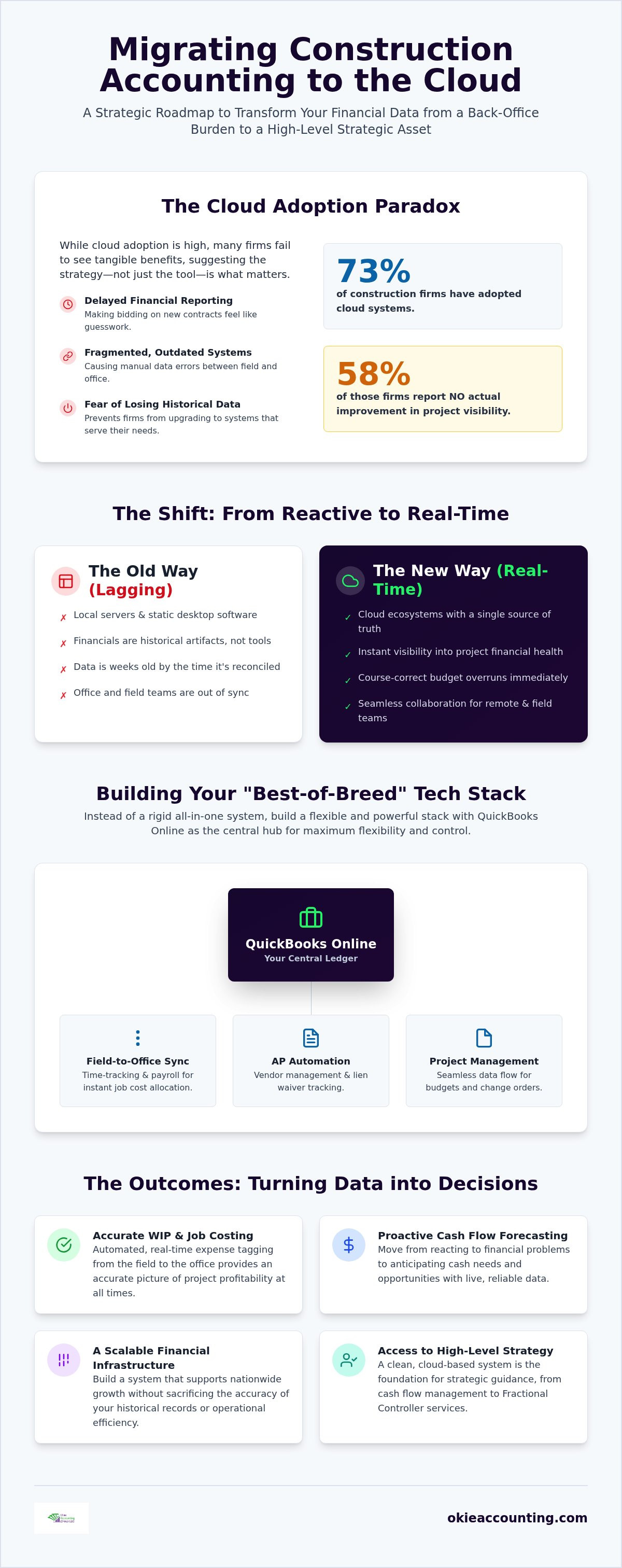
While 73% of construction firms have adopted cloud systems in 2026, nearly 58% of those companies report no actual improvement in project visibility. This suggests that simply migrating construction accounting to the cloud isn't a guaranteed fix; it's the beginning of a strategic shift. You've likely felt the pressure of delayed financial reporting that makes bidding on new contracts feel like guesswork. It's exhausting to reconcile manual data errors between the field and the office. The fear of losing historical project data often keeps firms stuck in outdated, fragmented systems that no longer serve their needs.
We understand that your financial data is the backbone of your firm's structural integrity. This guide provides a clear roadmap to transition your business into a cloud-based ecosystem that ensures real-time job costing and rigorous profit protection. You'll learn how to achieve seamless integration between payroll, field time-tracking, and your core ledger. We'll explore how to build a scalable financial infrastructure that supports nationwide growth without sacrificing the accuracy of your historical records. By the end of this guide, you'll have the clarity needed to turn your accounting from a back-office burden into a high-level strategic asset.
Why Construction Firms are Migrating Accounting to the Cloud in 2026
For decades, construction firms relied on local servers and static desktop software to manage their books. This created a reactive environment where financial statements were historical artifacts rather than management tools. Migrating construction accounting to the cloud represents a fundamental shift from this reactive bookkeeping to dynamic, real-time financial oversight. Instead of waiting weeks to see how a project performed, owners now have instant visibility into their financial health. This isn't just about changing software; it's about building a structural framework for long-term profit protection.
Desktop systems often suffer from lagging data. By the time an invoice is manually keyed in and reconciled, the project has already moved forward, often leaving the office out of sync with the field. Cloud ecosystems solve this by providing a single source of truth that updates as transactions occur. When you can identify a budget overrun while the crew is still on-site, you can course-correct before the margin evaporates. This level of oversight is essential for remote collaboration. Whether your team is at the home office or a job site across the country, everyone works from the same live data set.
The Death of the Paper Trail: Efficiency Gains
Manual data entry is the enemy of accuracy and speed. Modern cloud accounting software eliminates these bottlenecks through automated bank feeds and direct receipt capture. This automation reduces the reporting gap from several weeks to mere minutes. When your systems are integrated, you can capture expenses the moment they happen in the field. This efficiency offers several critical advantages:
Automated Workflows: Field teams can upload receipts and time logs directly, triggering immediate updates in the general ledger.
Reduced Errors: Eliminating double-entry between disparate systems minimizes the risk of costly manual mistakes.
Financial Readiness: You're always prepared for lenders or bonding companies. When they request updated reports, you don't have to scramble; you provide verified data with a few clicks.
From Administrative Burden to Strategic Asset
Many business owners feel buried by administrative tasks that pull them away from growth opportunities. Cloud systems liberate you to focus on high-value activities like bidding and project execution. Real-time data allows for data-driven decisions during the heat of a project lifecycle. You move from wondering if you're profitable to knowing exactly where every dollar stands. Cloud accounting is the foundational infrastructure for modern construction growth. By migrating construction accounting to the cloud, you're not just updating your tools; you're gaining a strategic partner in your firm's success. This transition often opens the door for high-level Fractional Controller Services that provide the strategic oversight needed for nationwide expansion.
Building Your Construction Tech Stack: QuickBooks Online and Beyond
Choosing the right tools is the next critical step after deciding to move your operations. While some vendors push all-in-one proprietary systems, a "Best-of-Breed" approach often provides superior flexibility and cost control. At the heart of this strategy is QuickBooks Online. It serves as the central general ledger, acting as the single source of truth for your entire firm. By migrating construction accounting to the cloud with a robust anchor like QBO, you create a scalable foundation that grows with your business.
The Central Ledger: Why QuickBooks Online Wins
QuickBooks Online has become the industry standard for cloud-based ledgers because it bridges the gap between field operations and executive oversight. Its accessibility allows remote teams and external fractional controllers to collaborate within the same live environment. You no longer need to send back-and-forth files or deal with version control issues. The platform's robust API ecosystem means you can link specialized tools without a complete software "rip and replace" later. Automatic updates ensure you're always in compliance with the latest financial regulations, providing peace of mind as your project volume increases.
Essential Integrations for Profit Tracking
A ledger alone isn't enough to protect your margins. You need specialized field tools that feed data directly into your core system. This connectivity eliminates the manual entry errors mentioned in the previous section. Key integration categories include:
Field-to-Office Sync: Using time-tracking apps that flow into construction payroll services ensures that labor costs are allocated to the correct job codes instantly.
Accounts Payable Automation: Tools that handle vendor management and lien waiver tracking reduce administrative friction and improve cash flow visibility.
Project Management: Integrating platforms like Procore or Buildertrend provides 360-degree job visibility, linking project progress directly to financial health.
For these integrations to work, your foundation must be sound. A QuickBooks setup for contractors requires professional configuration to handle the nuances of job costing and class tracking. Without this structural integrity, your data remains fragmented. If you're ready to build a tech stack that actually supports your growth, you can schedule a brief consultation to discuss your firm's specific needs. Proper implementation is the difference between a software subscription and a strategic asset.
The 5-Step Framework for a Successful Cloud Migration
A successful transition requires more than a simple data export. The quality of your results depends entirely on the structural integrity of the data being moved. If you migrate un-reconciled books or messy vendor lists, you're simply moving your existing problems to a more expensive platform. We call this the "garbage in, garbage out" trap. It's the primary reason many firms fail to see the visibility improvements they were promised. Migrating construction accounting to the cloud should be treated as a structural overhaul of your financial foundation, not just a software update.
Step 1 & 2: Data Cleanup and Mapping
Before the technical move happens, you must perform a rigorous audit of your current ledger. This begins with reconciling every bank and credit card account to the penny. You should also purge your vendor list, removing duplicates or inactive entries that clutter your reporting. A clean start is essential for accurate automated workflows later.
The most critical part of this phase is refining your Chart of Accounts. It must be structured to support granular job costing and Work in Progress (WIP) reporting. You'll need to map historical project data carefully so that your multi-year project trends remain visible after the transition. This mapping ensures continuity and protects the long-term health of your financial history. Without this step, you risk losing the context of your past performance.
Step 3, 4 & 5: Execution, Verification, and Training
Once the data is clean, choose a firm cutoff date. This is typically the end of a fiscal month or a fiscal year. This provides a clear boundary for your financial records and makes reconciliation much simpler. The execution phase involves the technical transfer of data from your desktop software or spreadsheets into the cloud environment. While automated tools exist, they often require manual adjustment to handle construction-specific nuances.
Validation is the next non-negotiable step. Run parallel reports in both your old and new systems for the final month to ensure that balances, open invoices, and job costs match exactly. Any discrepancy at this stage will only grow larger over time. Finally, focus on team onboarding. Your field and office staff need to understand the new digital workflows to maintain data accuracy. A professional QuickBooks training for contractors session is essential during this phase. It bridges the gap between having the tool and knowing how to use it for profit protection. Proper training ensures that your team doesn't fall back into old, manual habits that compromise your data.
Overcoming Construction-Specific Migration Hurdles
Many contractors hesitate to move because they fear losing their grasp on Work in Progress (WIP) and granular Job Costing. It's a valid concern; in a desktop environment, these reports are often the result of complex manual spreadsheets that require hours of back-office labor.
However, migrating construction accounting to the cloud actually strengthens these processes by enabling real-time expense tagging. The shift from static data to live dashboards ensures that your financial oversight is as active as your job sites. When migrating construction accounting to the cloud, the goal is to gain clarity, not just a new login.
Preserving Job Costing Integrity
Setting up "Projects" in a cloud environment allows you to mirror your previous job structure while gaining mobile accessibility that desktop systems simply can't match. Field teams can tag every expense, material purchase, or labor hour to a specific job at the point of entry using mobile apps. This eliminates the "memory gap" that occurs when office staff try to categorize receipts weeks after the purchase. When you're deciding how much historical data to bring over, remember that a two-year look-back is typically sufficient for active or recently closed projects. Historical data is a guide, but real-time data is your survival tool. Focusing on current project health prevents your new system from being weighed down by irrelevant data from completed contracts that no longer impact your cash flow.
Managing Payroll and Compliance in the Cloud
Managing a workforce across multiple job sites and jurisdictions is a logistical minefield that often leads to compliance errors. Cloud systems simplify this by automating labor burden calculations, ensuring your project costing reflects the true cost of every man-hour, including taxes, insurance, and benefits. For firms working across state lines or on government contracts, integrated construction payroll services are indispensable. These systems automatically handle multi-state withholding and prevailing wage requirements, significantly reducing the risk of non-compliance. Automating labor costs at the source ensures that your job costing is accurate to the penny. Automated tax filings further protect your firm by eliminating late-payment penalties and ensuring financial readiness for audits.
If you're concerned about maintaining the structural integrity of your job costs during a transition, book a discovery call to discuss a tailored migration plan that protects your margins and streamlines your operations.
Leveraging Your Cloud System for Strategic Growth
Migrating construction accounting to the cloud is more than a technical upgrade; it's an entry ticket to high-level financial leadership. While basic bookkeeping records what happened in the past, a cloud-based ecosystem allows you to transition into proactive oversight. This shift is essential for firms looking to scale beyond their current capacity. Unlike large enterprises that maintain expensive internal CFOs, mid-sized contractors can now access Fractional Controller Services thanks to the accessibility of live data. This levels the playing field, allowing you to use the same sophisticated financial tools as nationwide firms without the overhead of a full-time executive.
The Power of Fractional Financial Leadership
A fractional controller acts as a disciplined strategic mentor for your business. They use live cloud data to build rigorous internal controls and project budgets that protect your bottom line. Instead of looking at a Profit & Loss statement as a post-mortem, they interpret these documents to drive your bidding strategy and expansion plans. If your margins are slipping on specific job types, they identify the trend before it impacts your annual goals. This transition transforms your accounting from a back-office burden into a roadmap for growth. You can learn more about how this works in our guide on Fractional Controller Services.
Cash Flow Forecasting and Profit Protection
The construction industry remains notoriously cash-heavy, and 2026 market data shows the global construction software market is projected to reach $2,332 million as firms chase better visibility. Accurate construction cash flow management relies on the real-time data provided by your cloud ecosystem. You can predict cash gaps weeks before they occur, allowing you to manage vendor payments or adjust draw schedules proactively. This foresight is the difference between a thriving firm and one struggling to meet payroll.
Protecting your profit margins requires tracking specific Key Performance Indicators (KPIs) through your cloud dashboard. You should focus on metrics that provide immediate clarity:
Revenue per employee: Measures your operational efficiency and labor productivity.
Gross margin by job type: Identifies which niches are truly profitable.
Days Sales Outstanding (DSO): Ensures your collections process is keeping pace with your expenses.
Moving toward a disciplined monthly financial review ensures these numbers stay within healthy ranges. It's time to stop recording history and start forecasting your future. By migrating construction accounting to the cloud, you build the structural integrity needed for long-term health. If you're ready to secure your firm's financial future, schedule a consultation to build your cloud framework today.
Building a Foundation for Real-Time Profitability
The transition from manual, lagging desktop systems to a dynamic cloud environment is the most critical structural upgrade a modern construction firm can make. By migrating construction accounting to the cloud, you move beyond basic data entry and gain the real-time visibility necessary to protect your project margins. Success in this shift depends on more than just new software; it requires a disciplined framework that ensures the structural integrity of your financial data from day one. You've seen how professional configuration and integrated field tools turn fragmented records into a cohesive strategy for nationwide growth.
We provide the specialized construction financial oversight and expert QuickBooks Online configuration your business needs to thrive. Our strategic fractional controller partnership is designed to alleviate industry-specific stress by giving you total control over your cash flow and job costing. It's time to stop reacting to historical data and start leading your firm with confidence. Gain financial clarity with a professional QuickBooks Online setup today. Your firm's long-term stability is built on the systems you establish now, and we are ready to help you build them right.
Frequently Asked Questions
Is cloud accounting secure enough for a construction company?
Cloud accounting platforms utilize bank-level encryption and multi-factor authentication that often exceeds the security of on-site servers. In 2026, data privacy regulations in states like Indiana and California require rigorous cybersecurity standards that cloud providers are built to meet. This infrastructure protects your project data from ransomware and local hardware failures. It's a proactive way to ensure your firm's financial information remains accessible and secure across various job sites.
Can I move my existing QuickBooks Desktop data to QuickBooks Online?
You can move your desktop data to the cloud, but the process requires a disciplined approach to maintain structural integrity. Migrating construction accounting to the cloud isn't just a file upload; it's a mapping exercise. We recommend a professional QuickBooks Setup & Training session to ensure your chart of accounts and vendor lists are cleaned before the move. This prevents historical errors from compromising your new real-time financial ecosystem.
Will I lose my job costing history when I migrate to the cloud?
You won't lose your history if you follow a rigorous migration framework. We typically suggest a two-year look-back for active projects to maintain continuity in your job costing reports. By mapping historical data to your new "Projects" structure in the cloud, you preserve the ability to analyze past performance. This historical context is vital for refining your bidding strategy and identifying long-term profitability trends across different project types.
How long does a typical construction accounting migration take?
A typical migration for a mid-sized construction firm takes between 30 and 90 days. This timeline accounts for the necessary data cleanup, mapping, and the validation of parallel reports. We focus on a clean cutoff date, usually at the end of a fiscal month, to minimize operational disruption. This measured pace ensures that every balance and job cost is verified before your team fully transitions to the new digital workflow.
Do I need to hire a professional to manage my cloud migration?
Hiring a professional is the best way to avoid the common "garbage in, garbage out" trap that plagues many software transitions. Specialized experts understand the nuances of project-based financial tracking and can configure your system for accurate WIP reporting. Professional QuickBooks Setup & Training ensures that your team is onboarded correctly. This strategic partnership helps you move from basic administrative bookkeeping to high-level Fractional Controller Services.
What happens if my internet goes out on a job site while using cloud accounting?
Most modern field-integrated apps used in cloud ecosystems feature an offline mode for remote job sites. Your team can still track time and capture receipts without an active connection; the data syncs automatically once service is restored. Meanwhile, your home office maintains uninterrupted access to the central ledger. This resilience ensures that your data flow remains steady, even when working in areas with limited or unreliable internet infrastructure.
How does cloud accounting help with construction audit readiness?
Cloud accounting improves audit readiness by creating a permanent, searchable digital paper trail for every transaction. Instead of digging through physical files, you can provide lenders and bonding companies with verified reports in minutes. The system links digital receipts directly to expenses and tracks every change in the ledger. This level of transparency demonstrates rigorous management and provides the clarity needed to secure financing for larger, nationwide projects.
Can cloud software handle union payroll and prevailing wage requirements?
Yes, when integrated with specialized Payroll Management services, cloud software handles complex requirements like union fringe benefits and prevailing wage. These systems automate labor burden calculations and multi-state tax filings, which reduces the risk of non-compliance. Migrating construction accounting to the cloud allows you to manage these logistical complexities with quiet confidence. You ensure that every employee is paid correctly while protecting your firm from late-payment penalties.


Comments