
Procore & QuickBooks Integration: Construction Guide
- Wendy Okie

- 14 hours ago
- 11 min read
What if the biggest leak in your project margins isn't a material price hike, but the invisible gap between your field logs and your general ledger? You already know the frustration of your field teams and office staff looking at two completely different sets of numbers. It's a common struggle when integrating Procore with QuickBooks for construction companies, where data silos often lead to costly manual errors and shrinking profits. You likely feel that managing two systems is a necessary evil, but it doesn't have to be a source of constant friction.
This guide will show you how to transform your tech stack from a burden into a strategic asset. You'll discover how to eliminate redundant double entry, master precise job costing, and build a scalable financial infrastructure that protects your bottom line. We'll walk through the mechanics of bridging the gap between field operations and office accounting. By the end, you'll understand how to ensure your bidding is backed by real-time data while keeping your subcontractor invoicing streamlined and accurate. It's time to move beyond basic administrative tasks and start building a foundation for long-term financial health and operational clarity.
Bridging the Gap: Why Integrating Procore with QuickBooks is a Strategic Necessity
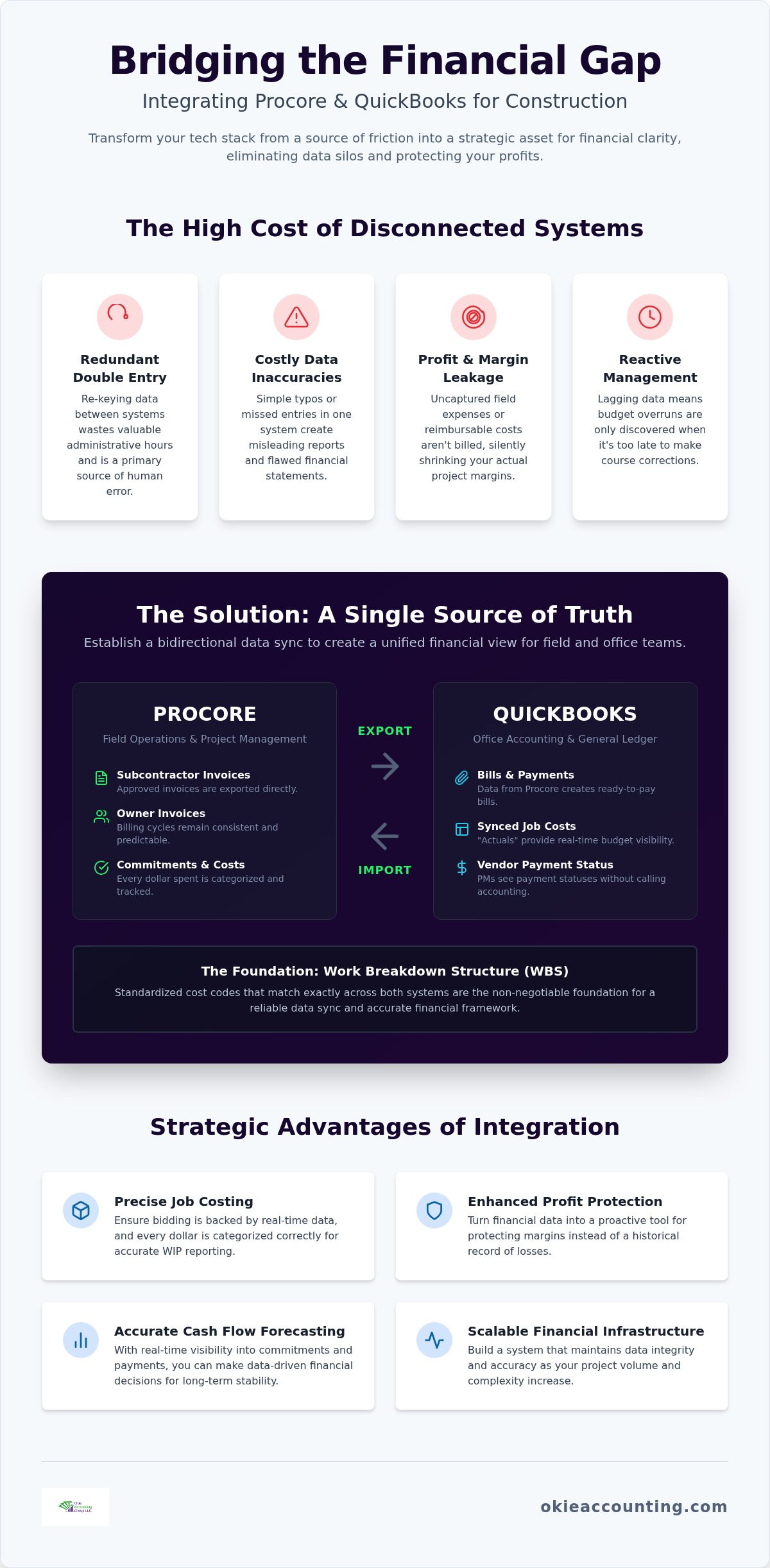
Success in construction is built on precision. However, many firms operate with a fractured financial view that undermines their structural integrity. Integrating Procore with QuickBooks for construction companies isn't just a technical convenience; it's the creation of a unified financial source of truth. When your field operations and office accounting teams work from disparate datasets, the resulting friction creates thousands in hidden costs and administrative drag.
Adhering to rigorous Construction accounting principles requires seamless coordination between project milestones and financial ledgers. Without a reliable sync, your Work in Progress (WIP) reporting is often weeks behind reality. This lag makes it impossible to detect budget overruns until it's too late to course-correct. By bridging this gap, you build a scalable financial infrastructure that maintains its accuracy even as your project volume and complexity increase.
The High Cost of Manual Data Entry
Re-keying data into two separate systems is more than a nuisance. It's a significant risk factor for human error. Every time an invoice or change order is manually copied from Procore into QuickBooks, the potential for a typo or missed entry grows. These inaccuracies don't just mess up the books; they lead to reactive management where you're always solving yesterday's problems. Financial leakage is the quiet loss of margin that occurs when field expenses or reimbursable costs aren't captured in the accounting system in time to be billed. This lack of synchronization creates a false sense of security while your actual margins shrink.
Real-Time Visibility for Better Decision Making
Strategic integration empowers project managers to see the immediate impact of every commitment on the total project budget. This real-time visibility turns financial data into a tool for profit protection rather than just a historical record. Instead of spending hours reconciling spreadsheets, your team can focus on high-level oversight and data-driven choices. Synced systems also ensure your financial statements are lender-ready and accurate at any given moment. This shift allows you to move beyond basic administrative tasks and lean into fractional controller services that prioritize long-term stability and growth.
Mapping the Data Flow: How Financial Data Syncs Between Systems
The Procore ERP Connector acts as the central nervous system for your project financials. It facilitates a bidirectional flow of information that ensures your project management and accounting teams are never out of alignment. When integrating Procore with QuickBooks for construction companies, the first step is establishing a clear map between the two platforms. Typically, "Projects" in Procore are mapped to "Customers" or "Projects" in QuickBooks Online. This structural link allows for the seamless transfer of data while maintaining the benefits of construction management software, specifically the ability to track granular project details without cluttering the general ledger.
Data integrity depends heavily on your Work Breakdown Structure (WBS) codes. These codes serve as the universal language between the field and the office. If your cost codes don't match exactly across both systems, the sync will fail or, worse, produce misleading reports. Consistency here is the foundation of a reliable financial framework.
Exporting from Procore to QuickBooks
The export process moves commitments and costs from the field to the general ledger. Once a project manager approves a subcontractor invoice in Procore, it can be sent directly to QuickBooks as a bill. This automation eliminates the need for the accounting team to wait for paper trails or email attachments. Owner invoices also flow through this pipeline, ensuring that your billing cycles remain consistent and predictable. By using standardized cost codes, you ensure that every dollar spent in the field is categorized correctly in your financial records, which is essential for profit protection.
Importing from QuickBooks to Procore
While exporting handles outgoing data, importing brings essential financial "actuals" back to the project team. Synced job costs allow field teams to see exactly how much has been spent against their budget in real-time. This visibility is vital for accurate budget tracking and prevents overruns. Additionally, vendor payment records sync back to Procore. This provides project managers with immediate visibility into payment statuses without needing to call the accounting department. Managing insurance and compliance also becomes more efficient; status updates in one system can reflect in the other, protecting your firm from unnecessary risk.
If you find the technical setup of these sync points overwhelming, our team offers specialized QuickBooks setup and training to ensure your data flows correctly from day one. To discuss how a structured sync can protect your margins, you can schedule a brief discovery call with our experts.
Technical Requirements and Common Limitations to Navigate
Successful integration begins with a rigorous audit of your current software environment. You can't build a robust financial framework on a platform that lacks the necessary structural features. When integrating Procore with Quickbooks for construction companies, your specific edition of QuickBooks Online is the most critical variable. You must also ensure your internal team has the correct authorization levels. Specifically, Company Administrator permissions in Procore are mandatory to initiate and manage the ERP Connector. Without these high-level permissions, the secure handshake between the two platforms cannot occur.
Procore's Financial Management tools also have specific prerequisites. You must have the "Commitments" and "Prime Contracts" tools active for the data to flow through the ERP connector. If these tools aren't configured correctly, your financial data will remain siloed in the field. This technical alignment ensures that your project managers and accounting staff are working within a synchronized ecosystem rather than battling disconnected spreadsheets.
QuickBooks Online Requirements
QuickBooks Online Plus or Advanced represents the minimum standard for professional contractors. These versions include the native "Projects" feature, which is essential for the integration's architecture to function correctly. Simple Start and Essentials editions are insufficient because they lack the project-based tracking capabilities required to map Procore's granular data. For a step-by-step technical walkthrough, you should consult Procore's QuickBooks Integration Setup Guide to ensure your settings align with industry best practices. Without these foundational features, your attempts at integrating Procore with Quickbooks for construction companies will likely result in fragmented data and manual workarounds.
Navigating Integration "Gotchas"
Multi-entity firms face a unique structural hurdle. Procore typically supports a "one company per Procore site" configuration. If you manage multiple legal entities with separate tax IDs, you'll need a strategic approach to avoid data fragmentation. Another common "gotcha" involves subcontractor invoices. Procore won't export negative values to QuickBooks. If you need to record a credit or a deduction, you must handle these as adjustments within the accounting system rather than expecting a direct sync. Sales tax configurations also present a layer of complexity. You must manually align tax codes between both systems to prevent reconciliation headaches during month-end closing.
Finally, ensure that any existing sub-customers in your accounting file are converted to "Projects" before the initial sync. Failing to do this can result in duplicate entries and a compromised general ledger. If your current file feels disorganized, our QuickBooks setup and training services can help you clean up your data before you flip the switch on the integration.
The Pre-Sync Checklist: Preparing Your Books for Integration
A software integration is only as reliable as the data feeding it. If your financial records are disorganized, integrating procore with quickbooks for construction companies will simply automate the chaos. Before you initiate the sync, you must ensure your books possess the structural integrity required for high-level data mapping. A clean Chart of Accounts, specifically tailored for project-based accounting, is the first requirement. This foundation ensures that every transaction is categorized with the precision needed for accurate profit protection.
Precise vendor auditing is equally vital. During the initial export, Procore will attempt to match its records with your existing QuickBooks vendors. If your naming conventions are inconsistent, you'll end up with duplicate entries that require hours of manual correction. Establishing a standardized nomenclature for projects and vendors across both platforms is a non-negotiable step for maintaining data hygiene and preventing administrative bloat.
Cleaning Up Your General Ledger
Financial readiness begins with a thorough reconciliation of all bank and credit card accounts. Open balances or unallocated transactions create noise that the integration cannot filter. You should also archive inactive vendors and customers to streamline the data map and reduce the risk of mapping errors. This process isn't just about administrative tidiness; it's about creating a lean, efficient system. For those who need expert guidance during this phase, you can learn more about professional QuickBooks setup for contractors to ensure your file is integration-ready.
Defining Your Cost Code Structure
Cost codes act as the connective tissue between field activities and office reporting. You must align your Procore Cost Codes with QuickBooks Items and Services to ensure job costing data remains accurate. The goal is to maintain a level of granularity that supports detailed analysis without overwhelming the staff responsible for data entry. Finding this balance is a strategic task rather than a clerical one.
Strategic oversight is where the value of a Fractional Controller becomes evident. These experts design a data architecture that supports both immediate operational needs and long-term financial health. They ensure your systems are built to scale alongside your project volume. If you're ready to build a more resilient financial framework, schedule a discovery call with our team to discuss your specific needs.
Maximizing ROI: Strategic Oversight After the Sync
Establishing the technical connection is merely the foundation of your financial infrastructure. While integrating Procore with Quickbooks for construction companies eliminates the burden of double entry, the true return on investment lies in how you interpret the resulting data. Automation provides the speed, but strategic oversight provides the direction. Without a disciplined approach to reviewing your integrated reports, you risk possessing a high-speed pipeline of information that leads to the same reactive decision making as before.
Monthly financial reviews are essential to translate job cost data into actionable intelligence. These sessions allow you to identify trends in labor productivity, material price fluctuations, and subcontractor performance. By analyzing these variables within a unified system, you can refine your bidding strategies and ensure your future estimates are grounded in historical reality. This transition from basic administrative oversight to strategic financial management is what distinguishes a growing firm from one that is merely busy.
Transforming Data into Strategy
Data alone isn't strategy. A Fractional Controller utilizes your integrated dataset to build a comprehensive profit protection framework. By leveraging real-time job costs and commitments, we help you develop accurate cash flow forecasting models that look months into the future. This level of foresight is critical for managing the high-volume capital requirements of commercial construction. Additionally, this tech stack allows you to produce lender-ready financial statements on demand. When your bank sees that your project management and accounting systems are perfectly aligned, it builds a level of trust that can lead to better bonding capacities and more favorable credit terms. You can explore our Fractional Controller services for growing firms to see how we bridge the gap between software and strategy.
Ongoing Training and Support
The construction technology environment is never static. Both Procore and QuickBooks frequently release updates that can alter how data flows or how reports are generated. Continuous staff training ensures your team remains proficient as these tools evolve. It's also vital to remember that automated systems still require professional human oversight. Algorithms can't always account for the nuances of a complex change order or a unique contract provision. Professional review acts as a final safeguard against anomalies that automation might miss. To stay ahead of these shifts, refer to our comprehensive resource on Mastering QuickBooks for Contractors: The 2026 Strategic Guide. At Okie Accounting Group, we position ourselves as your long-term strategic partner, ensuring your financial systems remain as durable as the structures you build.
Building a Resilient Financial Infrastructure
A successful integration is more than a technical handshake; it's the construction of a reliable financial framework. By integrating Procore with Quickbooks for construction companies, you establish a single source of truth that eliminates administrative drag and protects your project margins. You've seen that success depends on a clean pre-sync environment and the disciplined use of bidirectional data flow to keep your field and office teams perfectly aligned. This structural integrity is what allows your business to scale without losing control of its data.
Okie Accounting Group serves as your strategic partner in this transition. Our cloud-based national service provides specialized construction accounting expertise and the high-level oversight of strategic fractional controller support. We move beyond basic data entry to help you build a system that produces lender-ready financials and accurate cash flow forecasts. It's time to stop reacting to the numbers and start using them to drive your growth.
Gain financial clarity with expert QuickBooks training and oversight.
Your journey toward operational clarity starts with a well-organized sync. We're ready to help you turn your financial data into a powerful tool for long-term stability.
Frequently Asked Questions
Does Procore work with QuickBooks Online or just Desktop?
Procore supports both QuickBooks Online and QuickBooks Desktop. For cloud users, you must utilize QuickBooks Online Plus or Advanced, as these versions include the "Projects" feature required for integrating Procore with Quickbooks for construction companies. For those on Desktop, the integration currently supports the 2022, 2023, and 2024 versions in the U.S. and Canada. Utilizing the correct edition ensures your financial data remains secure and accessible across your entire operation.
Will the Procore integration sync my past project data into QuickBooks?
The integration is primarily designed to sync data moving forward from the moment of activation. While you can link existing projects, importing years of historical data into QuickBooks through the connector isn't recommended due to the risk of duplicating entries. Most firms find it more effective to establish a "clean break" date. This approach preserves the integrity of your historical records while ensuring your new project-based financial tracking remains accurate.
Do I need a third-party app to connect Procore and QuickBooks?
You don't always need a third-party app, as Procore offers a native ERP Connector for many standard setups. However, many specialized contractors choose third-party tools like Smoothlink, which starts at $1,275 annually, to gain more granular control over data mapping. These connectors can provide additional features that the native tool might lack. Choosing the right connection method depends on your firm's specific reporting requirements and the complexity of your project structures.
How often does the data sync between Procore and QuickBooks Online?
The frequency of data synchronization depends on the specific connector you use. The native Procore ERP Connector typically requires an administrator to manually trigger the sync or "send" items to the ERP. This manual step ensures that only approved financial data enters your general ledger. In contrast, some third-party integrations offer automated schedules. This controlled flow of information is vital for maintaining a clean and accurate Work in Progress (WIP) report.
Can I sync subcontractor payments from QuickBooks back to Procore?
Yes, you can sync payment records from QuickBooks back to Procore to keep your field teams informed. This bidirectional capability provides your project managers with real-time visibility into payment statuses without them needing access to the accounting software. It streamlines communication between the office and the job site. Specific licensing for Procore Pay may be required to export payments directly, so you should verify your current agreement with your software representative.
What happens if I change a cost code in QuickBooks after the sync is active?
Changing a cost code in QuickBooks after the sync is active will likely break the link between the two systems. Data integrity relies on a one-to-one match between your Procore cost codes and your QuickBooks items or services. If a change is necessary, it must be carefully coordinated across both platforms to prevent "orphaned" data or sync errors. Maintaining a consistent Work Breakdown Structure (WBS) is the cornerstone of a stable financial infrastructure.
Is the Procore QuickBooks Online Connector available for international editions?
The Procore QuickBooks Online Connector is available for international editions, including the U.S., Canada, UK, and Australia. However, sales tax configurations and local accounting standards can introduce complexities in non-U.S. locations. You'll need to manually align tax codes and currency settings to ensure your financial reporting remains compliant with local regulations. Our team often assists international firms in navigating these specific configuration hurdles to maintain structural integrity and profit protection.
How much does it cost to set up the Procore and QuickBooks integration?
Procore doesn't publish a flat rate for the integration, as their pricing model is based on your Annual Construction Volume (ACV). You'll need a custom quote to determine the specific cost for your firm. Additionally, you should budget for potential implementation fees and third-party connector subscriptions, such as Smoothlink’s annual fee of $1,275. Investing in professional setup and training ensures you maximize the ROI of integrating Procore with QuickBooks for construction companies from the start.


Comments