
QuickBooks Construction Cost Tracking: 2026 Guide
- Wendy Okie

- 3 days ago
- 12 min read
What if your accounting software did more than just record where your money went after the profit had already vanished? Most contractors are all too familiar with the sting of profit fade that appears only in the final weeks of a project. You've likely struggled to track labor costs across multiple job sites or watched a low-bid project turn into a loss due to inaccurate estimating. It's a frustrating cycle that stems from using a ledger when you actually need a strategic framework. Mastering QuickBooks for construction cost tracking is the first step toward reclaiming control over your margins.
We'll show you how to transform your financial setup into a powerful system for project-level profit protection. This guide explores the 2026 updates to QuickBooks Online Advanced, including native G702/G703 progress billing and automated retainage tracking, which provide the real-time visibility you need to stay profitable. You'll discover how to build a scalable structure that produces lender-ready financial statements without requiring the business owner to handle every data entry task. We're moving beyond basic bookkeeping to establish a foundation for long-term stability and professional oversight.
Why Precise Construction Cost Tracking is Your Firms Profit Shield in 2026
In a 2026 economic climate defined by volatile material prices and rising labor costs, relying on intuition to manage project margins is a high-risk strategy. Many contractors operate under the illusion of profitability because their bank balance looks healthy, only to face a "profit fade" during the final 20% of a build. This late-stage erosion occurs when overlooked expenses and unallocated labor hours finally hit the ledger. Without a dedicated system like QuickBooks for construction cost tracking, these leaks remain invisible until it's too late to course-correct. General bookkeeping often ignores the nuances of Construction accounting, treating every expense as a flat overhead cost rather than a project-specific variable. Specialty contractors require a more granular approach to capture the true cost of production.
The Dangers of Reactive Bookkeeping
Traditional accounting often suffers from a significant lag time. If you're waiting until the end of the month to see where your money went, you're driving by looking in the rearview mirror. Bank-balance management is particularly dangerous; it doesn't account for upcoming vendor payments, payroll tax liabilities, or retainage. Relying on this method leads to sudden cash flow crises that stall projects and damage your reputation. Achieving project-level visibility is essential for scaling. It allows you to see exactly how much cash is tied up in each job site at any given moment, providing the clarity needed to make proactive decisions instead of defensive ones.
Cost Tracking as a Strategic Asset
Precise data transforms your financial records from a compliance burden into a strategic asset. By analyzing historical cost data, you can identify which project types consistently yield the highest margins and which ones are draining your resources. This intelligence allows you to refine your bidding process, ensuring you only pursue work that aligns with your profit goals. It's the difference between winning a bid and winning a profitable contract. This level of granularity is also what lenders and sureties look for when determining your bonding capacity. A firm that demonstrates rigorous oversight is a lower risk and gains access to better financing terms.
Moving from administrative overhead to a strategic framework requires specialized QuickBooks software training to ensure your team captures data accurately at the source. This transition allows you to treat your accounting department as a profit-protection unit rather than a data-entry center. When you leverage fractional controller services, you gain an expert partner who interprets this data to drive long-term growth and financial stability.
Engineering Your QuickBooks Ecosystem for Real-Time Job Costing
Setting up QuickBooks for construction cost tracking requires moving beyond a standard retail or service-based configuration. You need a structural framework that mirrors the physical reality of your job sites. Most generalist setups fail because they lack the technical granularity required for high-stakes project management. By engineering your ecosystem correctly from the start, you ensure that every dollar flowing through your business is tied to a specific project milestone.
Step 1: Structuring Your Chart of Accounts
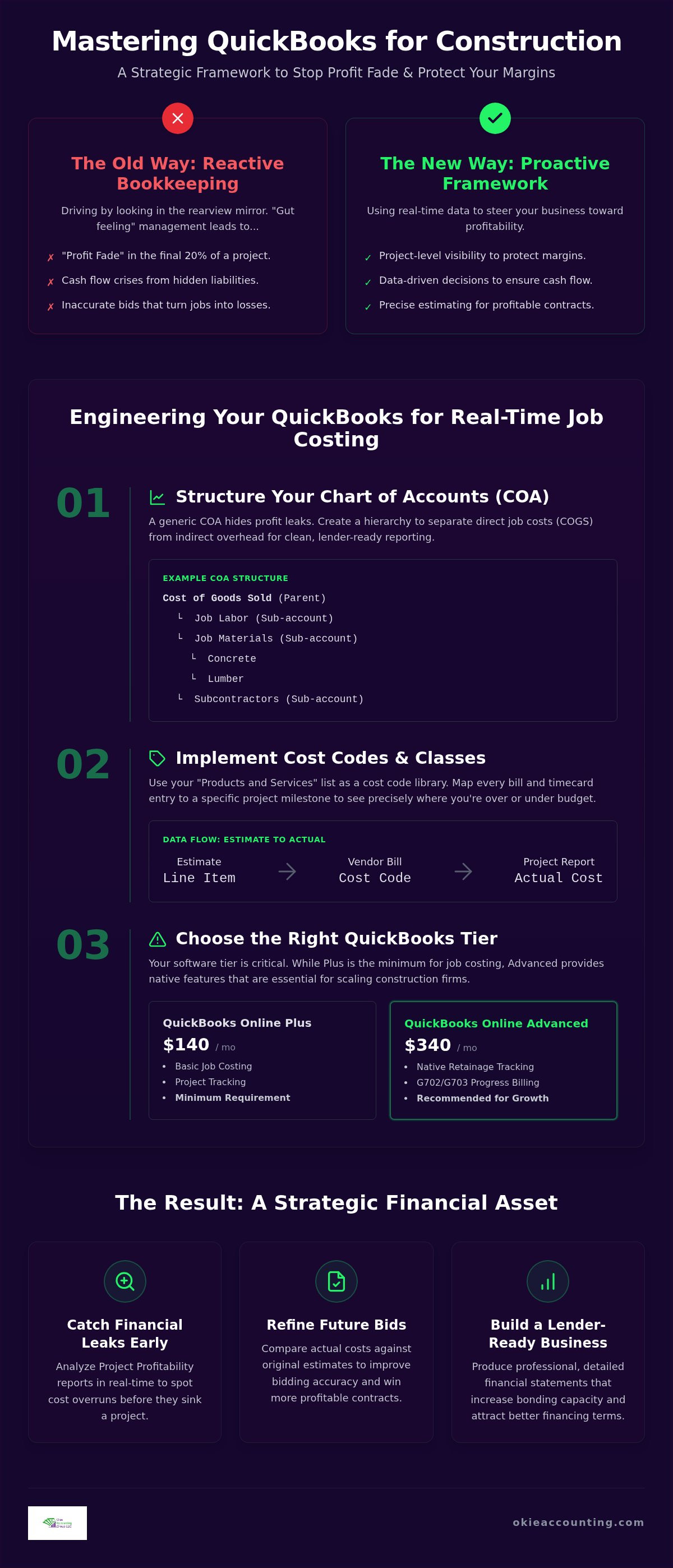
A generic Chart of Accounts (COA) is the enemy of financial clarity. You must distinguish between direct job costs (COGS) and indirect administrative overhead to protect your margins. Use parent accounts for broad categories like Job Labor or Materials, then utilize sub-accounts for specific trade categories or phases. This hierarchy allows for clean reporting that satisfies the standards outlined in the IRS Construction Industry Audit Technique Guide. Selecting the right software tier is equally critical; while QuickBooks Online Plus ($140 per month) is the minimum requirement for job costing, larger firms often require the Advanced tier ($340 per month) to access native retainage and progress billing features. The ideal 2026 construction COA structure is a hierarchical framework that isolates direct production costs from administrative overhead to ensure every dollar spent is visible at the project level.
Step 2: Implementing Cost Codes and Classes
In QuickBooks Online, your "Products and Services" list functions as your cost code library. By mapping these to your estimates, you ensure that every line item on a vendor bill or employee timecard aligns with a specific project milestone. This level of detail allows you to identify exactly where a job is overrunning before the project concludes. For firms operating across multiple states or managing distinct divisions, Class tracking is non-negotiable. It provides a secondary layer of data, allowing you to filter your financial health by region or department without cluttering your main ledger. This consistency between your initial bid and actual cost entry is what prevents profit fade.
Step 3: Connecting Field Data to the Back Office
Data is only as good as its speed. Integrating mobile time-tracking tools allows your field crews to log hours against specific projects and cost codes in real time. This eliminates the guesswork of Friday afternoon timecard entries and provides an immediate view of labor burndown. Similarly, mobile receipt capture ensures that field purchases are recorded instantly, preventing the "missing invoice" syndrome that plagues project closeouts. For a deeper dive into these technical workflows, explore our guide on Mastering QuickBooks for Contractors. If you're ready to move from manual entry to automated oversight, booking a discovery call can help align your technology with your growth goals.
Beyond the Basics: Advanced Cost Allocation and WIP Accounting
Once the structural foundation is in place, you must address the complexities of revenue recognition. Most standard accounting setups record revenue when an invoice is sent and expenses when they're paid. In construction, this creates a distorted view of financial health. A project might look profitable because you've front-loaded your billing, while your actual production costs haven't hit the ledger yet. Using QuickBooks for construction cost tracking effectively means implementing a Work in Progress (WIP) system to align your earned revenue with the costs incurred during the build.
The Mechanics of WIP Accounting
WIP acts as the essential bridge between your project costs and your earned revenue. It's a balance sheet adjustment that ensures your Profit and Loss statement reflects reality rather than just your billing cycle. By recording monthly WIP adjustments, you can identify "overbillings" (cash you've received but haven't earned) and "underbillings" (work you've completed but haven't billed). This distinction is vital for cash flow protection. If you're consistently overbilled, you're essentially borrowing from your future self, which often leads to a cash crunch at project completion. This reporting is also the primary metric your bonding agent uses to evaluate your firm's financial stability and capacity.
Strategic Labor Burden Allocation
True profitability is impossible to track if you only account for an employee's base hourly wage. Strategic labor burden allocation involves calculating the total cost of an hour of work, including payroll taxes, workers' compensation, health benefits, and retirement contributions. If your base rate is $30 per hour, your true cost might be $45 or $50 once these factors are included. Automating this allocation within QuickBooks ensures that every project reflects these hidden expenses in real time. Without this granularity, your project margins are artificially inflated, leading to low-bid losses on future contracts. This level of oversight is a core component of our management accounting services, providing the data needed for precise bidding.
Managing indirect costs, such as equipment depreciation and warehouse expenses, requires a methodical approach to allocation. These shouldn't simply sit in overhead; they should be distributed across projects based on usage or labor hours. Similarly, managing subcontractor retainage within QuickBooks is critical for both compliance and cash flow management. Tracking these held funds as a separate liability ensures you don't accidentally spend money that belongs to your subcontractors. Transitioning to these advanced methods often requires the guidance of fractional controller services to maintain structural integrity as your firm scales and the data becomes more complex.
Transforming Data into Strategy: Analyzing QuickBooks Profitability Reports
The real power of QuickBooks for construction cost tracking isn't in the data entry; it's in the strategic insights that emerge from your reports. When you've built a disciplined framework, your financial statements stop being a record of the past and start becoming a map for the future. The "Project Profitability" report is your primary tool for this transformation. It allows you to identify cost variances while a project is still active, giving you the opportunity to address inefficiencies before they erode your company reserves. This proactive approach prevents the common pitfall of discovering a loss only after the final invoice is paid.
Comparing actual costs against your initial estimates is equally critical for long-term health. If you notice a consistent 10% overrun on electrical labor across multiple jobs, that's a signal to adjust your bidding strategy for future contracts. This feedback loop ensures your estimates are grounded in reality rather than optimism. Additionally, using the "Unpaid Bills by Job" report helps you manage subcontractor relations by ensuring payments align with project milestones and cash flow availability. This level of oversight builds trust with your trade partners while protecting your own liquidity.
The Monthly Financial Review Framework
A successful firm doesn't just glance at the P&L once a month. You need a structured review process focused on specific KPIs like Gross Margin per Job and your weekly Burn Rate. These metrics tell you how much of each dollar earned is actually staying in the business and how fast you're consuming cash on active sites. Spotting a "red flag" project early is the difference between a minor setback and a financial crisis. For more advanced techniques on predicting your future needs, see our guide on Construction Cash Flow Management.
Customizing Reports for Stakeholders
Different stakeholders require different views of your data. Your lender or bonding agent needs comprehensive, lender-ready reports that demonstrate stability and rigorous oversight. In contrast, your project managers need simplified dashboards that show them exactly where they stand against their budget in the field. Maintaining clean, accurate data within QuickBooks for construction cost tracking isn't just about current operations; it's about building a business valuation that holds up under scrutiny. If your reporting feels more like a guessing game than a strategy, it's time to establish a more professional oversight system. You can schedule a discovery call to learn how we can help you turn your data into a competitive advantage.
Scaling with Confidence: The Role of a Fractional Controller in Cost Management
Scaling a construction firm requires a shift in perspective. You can't simply work harder to reach the next revenue milestone; you have to manage smarter. While many contractors view their accounting software as a necessary evil for tax compliance, disciplined firms treat QuickBooks for construction cost tracking as a high-fidelity radar system. The transition from basic administrative bookkeeping to strategic financial oversight is what separates firms that plateau from those that scale with confidence. A fractional controller doesn't just look at what happened last month. They interpret the data to forecast what will happen next quarter, identifying the capital requirements and profit margins necessary for sustainable growth.
Investing in professional QuickBooks setup and ongoing management offers a high ROI by eliminating the "invisible" costs of poor data. These costs include overpaid subcontractors, missed change orders, and inaccurate labor burden calculations that lead to low-bid losses. Your firm needs a strategic mentor who understands the unique mechanics of the construction sector, ensuring your financial foundation is as solid as your physical builds. This partnership allows you to move beyond the reactive nature of small business accounting and into the proactive realm of corporate financial management.
Bridging the Gap Between Software and Strategy
There's a fundamental difference between recording a transaction and managing a project. Recording a transaction is an administrative task that confirms money moved. Managing a project involves analyzing that movement against a budget to protect your profit margins. Okie Accounting Group builds the comprehensive structural framework your firm needs to make this distinction. We don't just provide software support; we establish the methodology of oversight that turns raw data into actionable intelligence. By utilizing our Fractional Controller Services, you gain a partner invested in your long-term health, moving you from a state of financial complexity to operational clarity.
Your Next Steps Toward Financial Clarity
Start by assessing your current QuickBooks setup. If you can't pull a real-time profitability report for a specific job site in under two minutes, your system is likely slowing you down. Transitioning to a managed accounting model doesn't have to disrupt your daily operations. It often begins with customized QuickBooks training for your internal team to ensure data is captured correctly at the source. This professional alignment allows you to step away from the data entry and focus on high-level business development. When your financial systems are built on a disciplined, forward-thinking framework, you gain the freedom to lead your firm with precision and control.
Building a Foundation for Sustainable Project Growth
Implementing a robust system for QuickBooks for construction cost tracking is more than a technical update; it's a commitment to your firm's long-term health. By moving beyond reactive bookkeeping and embracing advanced methods like WIP accounting and labor burden allocation, you gain the clarity needed to protect your margins. A disciplined framework prevents profit fade and turns raw project data into a strategic roadmap for future bidding success.
Scaling a construction business requires professional oversight that understands the unique mechanics of your industry. Okie Accounting Group provides specialized construction industry expertise and strategic fractional controller oversight to contractors across the United States. We help growth-minded owners transition from administrative tasks to high-level leadership. If you're ready to secure your firm's financial future, Gain Financial Clarity with Okie Accounting’s Strategic QuickBooks Oversight. You have the vision for your builds; let us provide the structural integrity for your data.
Frequently Asked Questions
How do I track labor costs for specific jobs in QuickBooks Online?
You'll need to utilize the Projects module combined with a specialized time-tracking tool. Assign every hour worked to a specific project and service item to ensure labor burden, including taxes and benefits, is correctly allocated. It's essential to configure payroll items to point toward the correct expense accounts. This level of detail provides an accurate view of your actual production costs versus your original bid.
What is the best way to handle subcontractor retainage in QuickBooks?
Set up a "Retainage Payable" Other Current Liability account on your Chart of Accounts. When recording a subcontractor invoice, split the line items by entering the full expense and a negative line for the amount held back. This tracks the liability on your balance sheet until the project concludes. It ensures your financial statements accurately reflect the funds you're required to pay your trade partners at completion.
Can QuickBooks Online handle WIP (Work in Progress) accounting for construction?
QuickBooks Online handles WIP through manual journal entries and specialized balance sheet accounts. Since the software doesn't have a native WIP button, you must create "Underbillings" and "Overbillings" accounts. You'll make monthly adjustments to align your earned revenue with the actual costs incurred on each site. This is a critical step for QuickBooks for construction cost tracking to ensure your statements satisfy bonding agents.
Should I use Classes or Projects for job costing in QuickBooks?
You should use both to build a comprehensive financial framework. The Projects module is designed for granular job costing, tracking income and expenses at the individual site level. Classes are better suited for high-level reporting, such as tracking performance by division, state, or office location. Using both allows you to see how a specific job is performing while also understanding the overall profitability of your different business units.
How do I fix common job costing errors in my existing QuickBooks file?
Start by reviewing your "Uncategorized" accounts and ensuring every transaction is assigned to a customer or project. You'll often need to reclassify expenses that were recorded as general overhead instead of direct job costs. If your historical data is messy, it's often more efficient to establish a "clean date" for new procedures. Professional QuickBooks for construction cost tracking setup ensures that future data entry follows a disciplined, error-free structural framework.
What is the difference between a construction bookkeeper and a fractional controller?
A construction bookkeeper focuses on the administrative task of recording transactions and reconciling accounts. In contrast, a fractional controller provides high-level strategic oversight and financial leadership. They interpret your data to drive growth, manage cash flow forecasting, and ensure your systems protect your profit margins. While a bookkeeper tells you where your money went, a fractional controller tells you where your business is going and how to lead it.
How often should I review my project profitability reports?
You should conduct a formal review of your project profitability reports at least once a month. However, high-volume firms or those with tight margins benefit from weekly check-ins. Regular reviews allow you to spot variances in labor or material costs before they turn into significant losses. This consistent oversight ensures that you can make proactive adjustments to field operations or future bids based on real-time financial performance.
Does QuickBooks integrate with construction project management software like Procore or Buildertrend?
QuickBooks Online features robust native integrations with industry-leading platforms like Procore and Buildertrend. These connections allow for a seamless flow of data between the field and the back office. Commitments, change orders, and daily logs created in your project management software sync directly into your accounting engine. This ecosystem approach eliminates double entry and ensures that your project managers and accounting team are looking at the same financial reality.


Comments