
QuickBooks Setup for Contractors: A 2026 Strategic Framework for Profit Protection
- Wendy Okie

- May 28
- 13 min read
Your accounting software isn't just a digital ledger for tax season; it's the structural foundation of your entire construction firm. When QuickBooks setup for contractors is treated as a one-time administrative chore rather than a strategic framework, profit margins inevitably begin to leak through the cracks of manual spreadsheets and fragmented data. You likely started your business to build something lasting, not to spend your nights agonizing over 1099 compliance or wondering why your bank balance doesn't match your project estimates.
It's frustrating to watch average hourly wages in the industry climb toward $40 while your visibility into actual job costs remains blurry. We agree that you deserve a system that offers quiet confidence and total financial control. This article provides a 2026 strategic framework to transform your QuickBooks into a project-based financial engine. You'll learn how to build a specialized financial infrastructure that tracks every job-related dollar and protects your margins. We will preview the methodology for real-time job costing, automated payroll, and the creation of lender-ready financial statements that position your firm for long-term stability.
Key Takeaways
Understand why a specialized QuickBooks setup for contractors is the only way to move beyond "data blindness" and achieve true project-centric accounting.
Discover the specific hierarchy required to track labor, materials, and subcontracted costs accurately using the "Project" logic in QuickBooks Online.
Identify whether your firm requires the "Plus" or "Advanced" version of QuickBooks based on your specific needs for custom roles and batch invoicing.
Master the step-by-step configuration of company settings and project lifecycles to ensure your financial data reflects your real-world field operations.
Recognize the transition from basic software management to strategic financial leadership that protects your long-term profit margins.
Why a Standard QuickBooks Setup Fails Construction Businesses
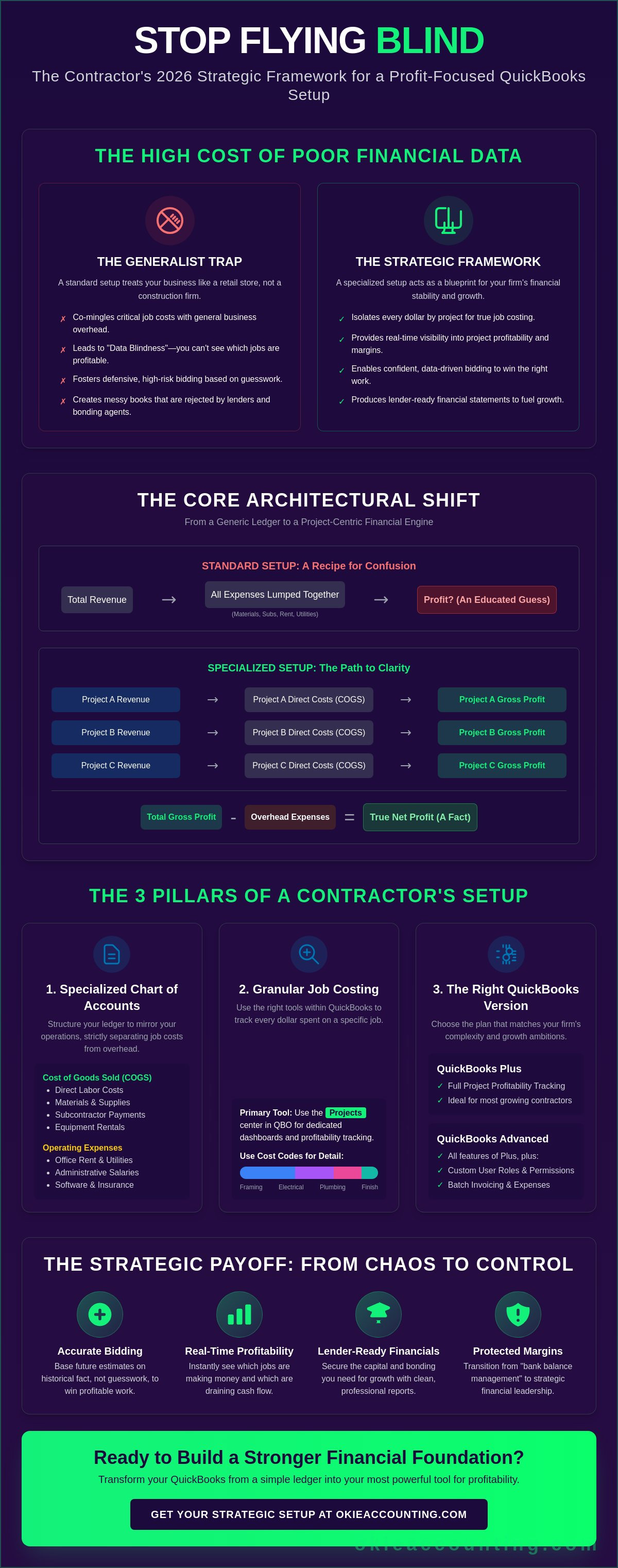
Most contractors treat their accounting software like a digital filing cabinet. They use it to store receipts and send invoices, but they rarely view it as a blueprint for their firm's survival. A standard QuickBooks setup for contractors often falls short because it ignores the fundamental construction accounting principles required to manage project-based work. In a generalist setup, the software treats every expense as a simple deduction against total revenue. This approach is dangerous. It fails because it doesn't distinguish between the costs required to keep the office running and the costs required to build a specific structure. Without a project-centric architecture, you're essentially flying blind.
The default Chart of Accounts provided by QuickBooks is designed for retail or simple service businesses. It groups expenses into broad categories that offer no insight into job performance. For a contractor, this leads to immediate data blindness. You might see that you spent $50,000 on materials last month, but you won't know which of your four active jobs consumed that budget. The primary risk here is co-mingling overhead with direct job costs. When these numbers are blurred, your profit margins are theoretical rather than factual. Moving from basic administrative bookkeeping to a strategic financial infrastructure requires a system that isolates every dollar by project.
The 'Generalist' Trap in Construction Accounting
Many owners fall into the habit of "bank-balance management." If there's money in the account, they assume the firm is healthy. However, tracking expenses without project tags hides the reality of shrinking margins. You might be losing money on every residential remodel while a single commercial build carries the entire company. Without a specialized QuickBooks setup for contractors, you'll never know which job is the anchor dragging you down. Generic categories like "Supplies" or "Subcontractors" are useless if they aren't tied to a specific contract. This lack of granularity prevents you from identifying which service lines are actually worth your time.
The High Cost of Poor Financial Data
Inaccurate data leads to defensive, high-risk bidding. If you don't know your true costs from your last three projects, your next estimate is just an educated guess. This uncertainty often results in underbidding just to win work, which only accelerates the erosion of your stability. Beyond daily operations, unorganized data creates immense pressure during tax season. Scrambling to verify 1099 data in January is a symptom of a broken system. Messy books also present a significant barrier to growth. Lenders and bonding companies require structured, accurate financial statements to assess risk. If your reports are cluttered with unallocated costs, you'll likely face higher interest rates or outright rejections when you need capital the most.
Designing Your Construction Chart of Accounts and Job Costing Structure
Designing a QuickBooks setup for contractors requires more than just listing expenses; it demands a project-centric accounting architecture that mirrors your actual construction workflows. At the heart of this system is a hierarchy that strictly separates direct job costs from general overhead. By categorizing labor, materials, and subcontracted costs within the Cost of Goods Sold (COGS) section of your ledger, you gain the ability to see your gross profit per project in real time. This structure ensures that every dollar spent in the field is visible, allowing you to identify which projects are driving growth and which are eroding your cash flow.
QuickBooks Online offers two ways to organize this data: Projects and Sub-customers. For modern firms, the "Projects" center is the superior choice. It provides a dedicated dashboard for tracking income, costs, and profitability without cluttering your main customer list. To achieve granular analysis, we implement "Cost Codes." These codes allow you to see exactly where money is being spent, whether it's on framing, electrical, or finish work. This level of detail is what separates a thriving business from one that's merely surviving. For accrual-basis firms, tracking Work in Progress (WIP) is also essential. This method allows you to match revenue with the actual costs incurred during a specific period, preventing the misleading profit swings that often plague generalist setups.
Building the Foundation: The Specialized Chart of Accounts
A standard ledger won't suffice for the complexities of the build environment. You must distinguish between COGS and Operating Expenses to protect your margins. Professional financial reporting for contractors includes specialized accounts like Retainage Receivable, Under-billings, and Over-billings. These accounts ensure your balance sheet reflects the true value of work performed but not yet invoiced. Following AICPA accounting standards ensures these reports are prepared with the rigor required by lenders and bonding agents. We recommend using a logical numbering system, such as the 5000 series for COGS, to maintain organizational discipline as your volume grows.
Implementing Real-Time Job Costing Logic
The bridge between your ledger and your projects is the "Products and Services" list. For a successful QuickBooks setup for contractors, every item must use a "Double-Sided Entry" configuration. This means the item is mapped to both an income account and an expense account. When you buy lumber for a specific job, the cost hits the project immediately. When you invoice the client for that lumber, the revenue is tracked against the same project. If you manage Time and Materials contracts, the "Billable" checkbox is your most vital tool. It ensures every field expense is captured and passed through to the final invoice, preventing unbilled costs from leaking out of your bottom line. If you're ready to move away from spreadsheet-based guessing, you can schedule a discovery call to discuss building a custom framework for your firm.
Choosing the Right QuickBooks Online Version and Construction Integrations
Selecting the correct software tier is a pivotal decision in your QuickBooks setup for contractors. While Intuit offers several versions, most are insufficient for the unique demands of the build industry. A general service business might thrive on a basic plan, but a contractor requires a project-centric accounting architecture to maintain profitability. The software must serve as more than a ledger; it must function as a real-time project management hub that captures labor, materials, and overhead with precision. Choosing the wrong version often leads to data silos and manual workarounds that compromise your financial integrity.
Essentials vs. Plus vs. Advanced: The Contractor's Verdict
The choice between versions often comes down to the granularity of your reporting. QuickBooks Online Plus is the minimum viable option for contractors because it includes the essential "Projects" and "Class Tracking" features required for job profitability analysis. Without these, you cannot isolate costs by contract, rendering your data nearly useless for strategic decision-making. This functionality is the bedrock of accurate construction job costing, which directly informs your bidding strategy and margin protection.
Firms with multiple project managers or high transaction volumes should consider QuickBooks Online Advanced. The primary benefit of Advanced is the ability to create custom user roles. This allows you to give project managers access to their specific job costs without exposing the company's entire financial history or sensitive payroll data. Additionally, the batch invoicing tools in Advanced save significant administrative time for subcontractors managing dozens of progress billings simultaneously.
Essential Tech Stack Add-ons for 2026
Even the best QuickBooks setup for contractors often requires specialized integrations to handle field operations. For accurate labor burden allocation, QuickBooks Time is indispensable. It allows field crews to track time against specific cost codes, ensuring that every hour of labor is correctly attributed to a project. This data flows directly into your software training services workflows, eliminating the errors associated with manual entry. For firms managing complex builds, integrating with Procore or Buildertrend creates a seamless link between project management and financial oversight. We also recommend cloud-based document management for lien waivers and insurance certificates. Keeping these documents digitally tethered to your accounting system protects your firm from legal disputes and payment delays. Strategic oversight of these tools ensures that your software stack works for you, rather than creating more administrative friction.
Step-by-Step QuickBooks Setup for Contractor Workflows
A successful QuickBooks setup for contractors begins in the "Account and Settings" menu. This is where you establish the firm's financial identity and reporting logic. You must select the "Construction" industry type to ensure the software suggests relevant categories for your chart of accounts. Set your fiscal year to match your tax reporting period and choose your accounting method. While many small firms start with "Cash," we recommend "Accrual" for any contractor managing Work in Progress (WIP). This ensures your income and expenses are matched in the period the work actually occurs, providing a true reflection of your project's health and protecting your long-term stability.
Configuring Project and Class Tracking
Enabling the Projects center is non-negotiable for accurate job costing. It allows you to isolate every dollar by contract without cluttering your general ledger. Follow this four-step sequence to enable it:
Click the Gear icon and select "Account and Settings."
Navigate to the "Advanced" tab on the left sidebar.
Locate the "Projects" section and click the pencil icon to edit.
Toggle "Organize all job-related activity in one place" to On and save your changes.
Once enabled, use "Classes" to track profitability across different business divisions, such as Residential vs. Commercial. The "Customer:Project" relationship is the critical link here. By nesting projects under specific customers, you create a clean reporting hierarchy that prevents field data from becoming a tangled mess. This structure ensures that your fractional controller or bookkeeper can generate reports that offer immediate clarity.
Establishing Subcontractor and 1099 Compliance
Compliance is a significant source of industry-specific stress, but a structured setup alleviates this burden. When adding a new vendor, immediately check the box "Track payments for 1099." This ensures that when the January 31, 2026, deadline arrives, your data is already compiled and ready for filing. You should also attach a PDF of the vendor's W-9 directly to their profile in QuickBooks. This creates an audit-ready digital paper trail that protects your firm. Beyond tax forms, use the "Notes" or custom fields to track Certificate of Insurance (COI) expiration dates. Paying a subcontractor with an expired policy is a massive liability risk that can be avoided with disciplined data entry. For firms with complex labor needs, integrating these workflows with specialized construction payroll services ensures that labor burden and compliance are handled with professional precision.
If you find the technical configuration of these systems overwhelming, you can book a discovery call to discuss a professional setup. Finally, define your "Products and Services" list to mirror your estimate categories. If your bids are broken down into phases like "Site Prep," "Foundation," and "Framing," your QuickBooks items must reflect this exact structure. This alignment is the only way to generate meaningful "Estimate vs. Actual" reports. A precise QuickBooks setup for contractors ensures that when a project manager reviews a report, the data is categorized in the language of the job site, not just the front office.
From Software Setup to Strategic Financial Leadership
A robust QuickBooks setup for contractors provides the framework for your firm's financial health, but technical configuration is only the first step. Software is a tool; strategic oversight is the engine that drives sustainable growth. Many owners reach a plateau where they have clean data but lack the specialized knowledge to translate those numbers into actionable business intelligence. If you're still spending your evenings cross-referencing field reports or if you're unable to explain a sudden dip in project margins to a bonding agent, you've likely outgrown DIY bookkeeping. The transition from administrative data entry to strategic financial leadership is what separates a local builder from a regional powerhouse.
Moving beyond the "rearview mirror" approach to accounting is the hallmark of a maturing firm. Strategic leadership involves using your structured data to forecast forward, anticipating cash flow gaps or material price hikes before they impact your bottom line. This shift allows you to move from a state of reactive stress to one of proactive control. You stop wondering if you're making money and start knowing exactly how each project contributes to your firm's long-term stability. This clarity is the ultimate reward for the disciplined systems you've built.
The Role of a Fractional Controller for Scaling Firms
There is a sharp distinction between basic administrative tasks and the high-level analysis provided by professional controller services. While a bookkeeper records what has already occurred, a fractional controller interprets that data to protect your firm's future. They use the information from your QuickBooks setup for contractors to manage complex variables like bonding capacity and working capital requirements. A controller identifies trends in your labor burden or material waste that might go unnoticed in a standard report. This level of oversight ensures that your financial statements aren't just accurate; they're strategically utilized to maximize your firm's borrowing power and operational efficiency.
Scaling with Confidence through Professional Oversight
Having a disciplined mentor for your finances provides a sense of quiet confidence that is rare in the construction industry. This partnership moves your firm toward "lender-ready" financials as a standard practice, rather than a last-minute scramble before a loan application. When your books are consistently organized and verified, you're always prepared for the scrutiny of banks, partners, or auditors. This structural integrity reflects the quality of your work in the field and signals to external partners that your firm is built on solid ground. If you're ready to stop managing by your bank balance and start leading with data, you can Schedule a consultation with Okie Accounting Group LLC to build a framework that protects your profit for the long term.
Secure Your Firm's Financial Future
A resilient firm is built on more than just physical structures; it requires a project-based financial architecture that can withstand market fluctuations. We have mapped out how a specialized QuickBooks setup for contractors serves as the vital link between field operations and long-term profit protection. By moving beyond basic ledger entry and embracing the strategic oversight discussed, you position your business to transition from a service provider to a market leader with total financial clarity. This framework ensures that every decision you make is backed by accurate, real-time data.
Okie Accounting Group LLC provides the cloud-based strategic financial oversight necessary for this transformation. With a dedicated focus on the construction and real estate sectors, we serve service-based entrepreneurs nationwide. Whether you require meticulous monthly bookkeeping or high-level fractional controller services, our team acts as your disciplined mentor in building a lender-ready financial engine. We are as invested in your firm's stability as you are. It is time to stop managing by intuition and start leading with a system designed for your specific industry needs.
Build Your Financial Infrastructure with Okie Accounting Group LLC
Frequently Asked Questions
What is the best version of QuickBooks for a construction company?
QuickBooks Online Plus is the minimum viable version for most construction firms because it includes essential project profitability and class tracking features. If your firm employs multiple project managers who need restricted access to specific data, QuickBooks Online Advanced is the superior choice. Advanced offers custom user roles and batch processing that help scaling companies maintain a high level of professional discipline and data integrity.
How do I track job costs for subcontractors in QuickBooks Online?
You track subcontractor costs by assigning every bill, check, or expense to a specific project in the "Customer/Project" field. By using double-sided items in your Products and Services list, you ensure that subcontractor payments are recorded as a direct job cost within the Cost of Goods Sold section. This method provides real-time visibility into your subcontracted labor expenses and prevents them from being buried in general overhead.
Can QuickBooks handle 1099 reporting for multiple contractors?
QuickBooks handles 1099-NEC and 1099-MISC reporting by allowing you to flag specific vendors for 1099 tracking during the initial setup. When you record a payment, the software automatically accumulates the data for the annual January 31 deadline. You can also upload W-9 forms directly to vendor profiles to ensure your records are audit-ready and compliant with current IRS regulations for work performed.
Do I need to set up a separate Chart of Accounts for construction?
A specialized Chart of Accounts is essential to separate direct job costs from general operating expenses. Construction-specific ledgers include accounts for materials, labor burden, and equipment rentals within the Cost of Goods Sold section. This structure allows you to calculate your gross profit margin accurately. This is a critical step in a professional QuickBooks setup for contractors that generic, out-of-the-box settings simply cannot provide.
How do I track Work in Progress (WIP) in QuickBooks?
Work in Progress is tracked by using the accrual accounting method and creating specialized accounts for "Costs in Excess of Billings" and "Billings in Excess of Costs." As you incur job costs that haven't been invoiced, you move them to the balance sheet. This process ensures that your profit and loss statement reflects the actual percentage of completion rather than just the timing of your cash flow.
Should I use QuickBooks Desktop or QuickBooks Online for my contracting business?
QuickBooks Online is the recommended standard for 2026 due to its cloud-based accessibility and seamless integration with modern field management tools. While Desktop Enterprise remains a robust option for some, Intuit has shifted its focus toward the Online platform. A modern QuickBooks setup for contractors relies on the flexibility of the cloud to capture data directly from the job site and collaborate with financial advisors.
What is the difference between a project and a customer in QuickBooks?
A "Customer" represents the person or entity paying for the work, while a "Project" is a specific job or contract tied to that customer. You can have multiple projects under a single customer, such as different phases of a residential development. Using the "Projects" center allows you to track income and expenses for each individual job without complicating your main customer list or your high-level financial statements.
How often should I review my QuickBooks reports as a contractor?
You should review project-level reports weekly to catch cost overruns before they erode your margins. On a monthly basis, a deeper review of your balance sheet and profit and loss statement is necessary to assess the overall health of the firm. Regular oversight helps you identify trends in labor burden or material waste, allowing for data-driven adjustments to your bidding and operational strategies.


Comments